
How to Create UGC Videos With AI That Still Feel Native
· UGC Video · 9 min read · Reels Farm Team
AI can speed up UGC production, but speed only helps if the final video still feels like something a real person would stop to watch. The difference usually comes down to structure and restraint.
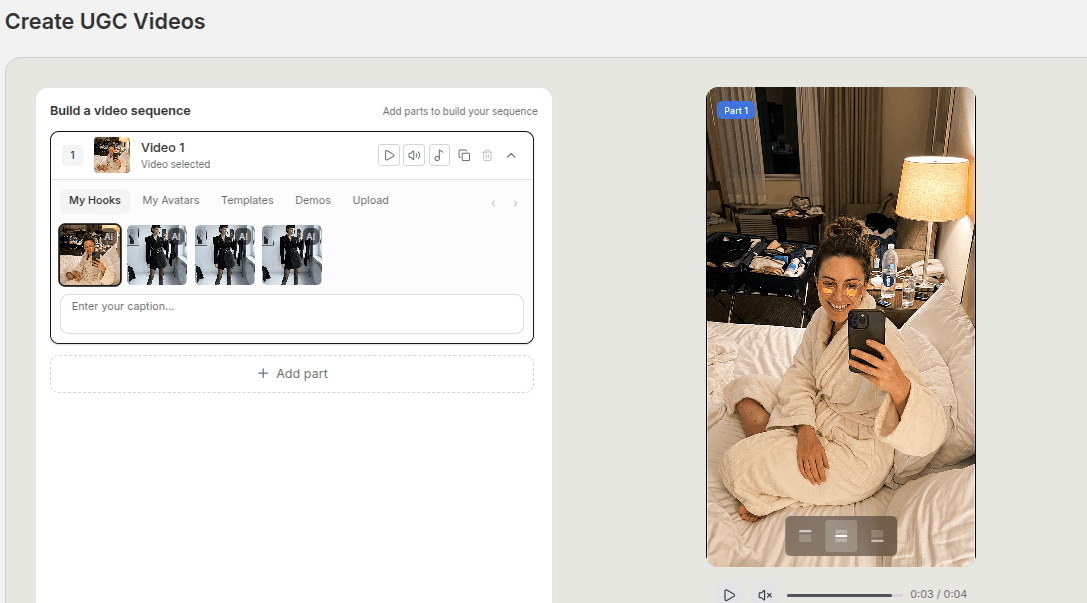
The market is already full of AI UGC that looks assembled from parts nobody bothered to direct.
The hook feels generic. The demo shows up too late. The text explains too much. The whole video technically says the right thing, but it does not feel native to the feed.
That is the real bar now. It is no longer enough to generate a UGC-style clip. The video still needs to feel like a believable short-form post with a clear job.
Quick Answer
If you want AI-assisted UGC videos to feel native, focus on five things:
- Start with one clear product angle.
- Build the video from a few strong parts instead of too many weak ones.
- Put the hook and the payoff in obvious places.
- Keep the text short and spoken.
- Remove anything that makes the edit feel overbuilt.
In practice, that usually means a tighter sequence, fewer parts, and better judgment about what each part is doing. An AI UGC video generator can help you assemble those parts without losing that control.
Step 1: Start With One Real Product Angle
Most weak UGC videos fail before the edit starts.
They fail at the angle.
If you try to make one short-form video do everything at once, the result gets muddy fast. You end up with a hook about one problem, a middle section about another, and a product payoff that never lands clearly.
Before you assemble any clips, answer three questions:
- Who is the video for?
- What is the main tension or desire?
- What should the viewer understand by the end?
That is enough to keep the sequence coherent.
For example, a product-led UGC video for a skincare offer might be built around one of these angles:
- why my old routine never felt simple enough
- the one product I actually kept using
- what changed when I stopped overcomplicating my routine
Each of those creates a different video.
The mistake is trying to merge all three into one 25-second asset.
Step 2: Build the Video in Parts
The strongest AI UGC workflows are modular.
You do not need one giant generated clip that carries the whole ad on its back. A better workflow is to assemble the video from parts that each do one job well.
That usually means:
- a hook that earns attention
- a supporting line or setup
- a demo, proof point, or visual explanation
- a payoff or conclusion
- a soft CTA if the format needs one
This is where a compositional editor is useful. When you can work with hooks, demos, avatar-led clips, uploaded footage, and templates as separate parts, the video becomes easier to shape.
The important thing is restraint.
Yes, you may be able to stack many parts in one sequence. That does not mean you should. For most product-led UGC, three to six strong parts are more useful than a bloated sequence full of filler. More parts only help when each one changes the viewer's understanding in a meaningful way.
Step 3: Get the Hook Right Before You Touch the Rest
People often obsess over the demo and forget the first second.
That is backwards.
If the hook is weak, the rest of the video never gets a fair chance.
A good hook for AI-assisted UGC does not need to sound flashy. It needs to sound pointed. The viewer should immediately feel the problem, curiosity gap, or promise.
Strong hook directions tend to be:
- problem-led
- mistake-led
- result-led
- comparison-led
What matters is that the hook matches the video that follows.
If the opening line says, "I stopped doing this and my skin got better," the next parts should show that change or support it quickly. If the first line says, "I did not expect this product to be this easy to use," the middle should prove ease of use, not drift into unrelated lifestyle shots.
The fastest way to make UGC feel fake is to let the hook promise one thing while the sequence delivers another.
Step 4: Keep the Text Natural
AI-assisted UGC tends to get exposed through the text layer before anything else.
You can often forgive an imperfect clip. You cannot easily forgive stiff, overexplained copy sitting on the screen the whole time.
Good on-screen text in UGC does three things:
- it helps the hook land
- it clarifies what the viewer is seeing
- it supports the payoff without becoming the whole message
It should read like something a person would actually say.
That means:
- shorter lines
- fewer claims
- less marketing language
- fewer stacked ideas in one sentence
If a line feels like website copy, cut it.
If a line repeats exactly what the footage already shows, cut it.
If a line makes the video feel like it is trying too hard, rewrite it in simpler language.
Step 5: Place the Product Moment Early Enough
Many weak UGC edits hide the product too long because the editor is trying to "build suspense."
That usually hurts more than it helps.
You do not need to show the product in the first frame every time, but the viewer should understand what the video is about early enough to care. In product-led short-form content, the audience is usually not asking for a mystery. They are asking for a relevant reason to keep watching.
That is why demos, hands-on product shots, or clear use-case visuals matter. They give the hook something real to lean on.
For some videos, the product appears directly after the opening line.
For others, it appears after one short setup beat.
The right placement depends on the angle, but waiting too long usually weakens belief instead of building it.
Step 6: Edit for Pace Before Export
This is the last pass most people rush.
Do one more review with a simple standard: does every part earn the next part?
If the answer is no, something has to go.
Check for:
- hooks that take too long to reach the point
- middle sections that repeat the same proof
- text overlays that slow the pace
- endings that drag after the message is already clear
The best native-feeling UGC usually has a little pressure in it. It keeps moving. It respects the speed of the feed without becoming chaotic.
That almost always comes from editing out excess, not adding more material.
Common Mistakes
Treating more parts as automatically better
More parts usually mean more opportunities to lose focus.
Writing the hook and the text in two different voices
The whole sequence should sound like it belongs to the same person and the same idea.
Waiting too long to show the product
Curiosity is useful. Confusion is not.
Letting the text carry the entire video
If the footage is weak and the text is doing all the work, the edit usually feels forced.
Using variations that barely change the message
If you want more useful UGC, create clearer angle shifts instead of tiny cosmetic edits.
FAQ
How many parts should an AI UGC video usually have?
For most short-form product videos, three to six parts is enough. Some offers need more, but very few need the maximum.
Do I need an avatar clip in every UGC sequence?
No. Avatar-led clips can help, especially for hooks or spokesperson moments, but they are one tool inside the sequence, not a requirement for every edit.
Can demos and uploads sit inside the same video?
Yes. In fact, mixing sources often helps the sequence feel more grounded as long as the order is deliberate.
What makes AI UGC feel repetitive?
Reused hooks, identical pacing, generic text, and overreliance on the same type of proof are the biggest reasons.
Final Take
Creating UGC videos with AI is the easy part.
Creating ones that still feel native requires better decisions.
A clear angle, a tighter structure, stronger hooks, believable product moments, and cleaner text do more for performance than sheer content volume. If the workflow lets you sequence hooks, demos, avatar clips, and supporting footage cleanly, you can move fast without making the final video feel synthetic.
Related tools
If you want to turn this topic into something usable right now, start with these tools.
UGC Script Generator
Build UGC-style script outlines for testimonials, demos, and problem-solution videos.
TikTok Hook Generator
Generate TikTok hook ideas for product demos, lessons, and founder-led content.
TikTok Caption Generator
Create short TikTok captions for demos, lessons, proof posts, and quick takes.
Related reading
- This Is Why Your UGC Videos Are Stuck at 200 Views
A strong UGC format can still stall if the account has not been warmed up around the right audience, niche, and engagement signals.
- Best UGC Video Structure for Product-Led Short-Form Ads
Most weak UGC ads have a structure problem. The strongest ones move from hook to proof to payoff without wasting the middle.
- How to Build a UGC Video From Hooks, Demos, and Product Clips
The cleanest UGC workflow starts with the hook, places the demo with intent, and only keeps the supporting clips that move the story forward.
- Why Some AI Videos Get Shared and Others Get Ignored
AI videos get shared when they give people something worth passing along, not just something polished to watch.
- How to Batch-Produce UGC Videos Using Viral Hooks
Batch production is the difference between making videos when you feel like it and making videos because the system says it is time.
- 9 Product Video Ideas You Can Make Without Filming
You do not always need a camera shoot to make useful product videos. Many strong ideas can start from images, scenes, and simple scripts.
Related comparisons
- Best AI UGC Video Tools for Short-Form Content
A buying guide to AI UGC video tools, with ReelsFarm positioned for complete short-form content workflows.
- Best TikTok Automation Tools for Content Teams
A guide to TikTok automation tools for teams that need content creation, scheduling, publishing, and creative control.
- Best AI Slideshow Makers for TikTok
A guide to AI slideshow makers for TikTok, with ReelsFarm positioned for repeatable slideshow automation.
- Best AI UGC Tools for Ecommerce Brands
A source-checked guide to six AI UGC tools for ecommerce product content and publishing workflows.
Drive traffic to what matters on autopilot.
Create standout posts, line up your calendar, and publish consistently without juggling a dozen tools.