
How to Build a UGC Video From Hooks, Demos, and Product Clips
· UGC Video · 9 min read · Reels Farm Team
The biggest advantage of a modular UGC workflow is control. You can build a better short-form sequence when each part has a clear job and the order still stays easy to change.
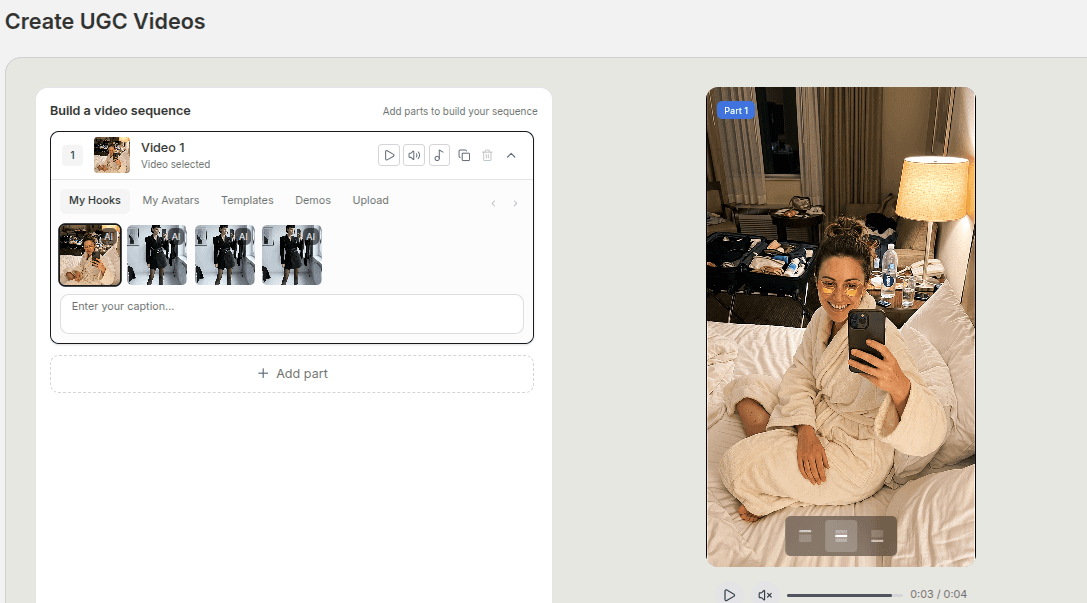
Many teams approach UGC like they are waiting for one perfect video to appear.
That is a slow way to work.
A better approach is modular. Start with strong parts, give each part one job, then assemble the sequence around the product angle you want to push.
Quick Answer
If you want to build a stronger UGC video from modular parts, the cleanest process is:
- choose the hook first
- place the main demo or product proof next
- add only the supporting clips that make the message clearer
- set the text for each part carefully
- trim the sequence until the pace feels tight
That usually creates a better video than trying to stack every available asset into one edit.
Step 1: Start With the Best Hook
The opening part determines what every other part needs to do.
If the hook is about a mistake, the middle should show the correction.
If the hook is about a result, the middle should explain or demonstrate that result.
If the hook is direct and product-led, the following parts should deepen belief quickly.
That is why the hook should be selected first.
In a modular editor, it is tempting to browse clips and build from whatever looks interesting. That usually produces a weaker sequence because the structure starts reacting to the parts instead of directing them.
Start with the opening promise. Then the rest of the sequence becomes easier to judge.
Step 2: Place the Demo Where Belief Peaks
The demo is often the center of gravity in product-led UGC.
It gives the viewer something concrete. It turns language into evidence.
But demos only work if they arrive in the right place.
Too early, and the audience may not yet understand why they should care.
Too late, and the opening loses force before belief arrives.
For many short-form sequences, the strongest placement is immediately after the hook or after one brief setup beat. The goal is to let the viewer connect the promise and the proof without a long empty gap between them.
This is also where a modular workflow helps. If you can drop in different demo clips, compare pacing, and reorder parts quickly, you can find the point where the product feels most convincing.
Step 3: Use Supporting Clips With a Purpose
After the hook and the core demo, you may still need more material.
That is where supporting clips come in:
- product close-ups
- use-case footage
- avatar-led reactions or lines
- comparison shots
- simple cutaways
Each one should answer a question the viewer still has.
What does it look like in use?
How fast is it?
What changes after the product is introduced?
What does the result actually feel like?
If a supporting clip does not answer a useful question, it is probably filler.
Step 4: Write the Caption Layer Per Part
One reason modular UGC workflows are useful is that each part can carry its own text treatment.
That gives you more control, but it also creates more ways to clutter the video if you are careless.
The text on each part should support the job of that part:
- the hook text opens the loop
- the demo text clarifies what the viewer is seeing
- the closing text sharpens the takeaway
You do not need every part to carry the same weight.
Some parts should be nearly silent visually. Others need one short line to guide attention. The important thing is that the text and the footage cooperate instead of fighting for the same attention.
Step 5: Add Music and Rhythm Carefully
Background music can help hold the sequence together, but it should not be doing rescue work for a weak edit.
The same goes for fast cuts.
If the pacing only works because the editor is covering structural weakness with noise, the video will still feel off.
Music and rhythm should support what is already there:
- a cleaner flow between parts
- a little more pressure in the sequence
- a better sense of momentum
They should not become the main attraction.
Step 6: Keep the Part Count Under Control
A modular editor may let you build long sequences with many individual pieces.
That is helpful when you need flexibility, but it is also where discipline matters most.
Most UGC videos do not need the maximum number of parts available. They need the best few parts in the best order.
As a rule, if two parts are doing the same job, keep the stronger one.
If three parts are all trying to prove the same point, cut at least one.
If the viewer understands the message before the final part, that final part may be unnecessary.
Step 7: Save Strong Versions Instead of Rebuilding Everything
Once you land on a sequence that works, treat it like an asset.
Do not rely on memory to recreate it later.
Save the draft. Save the winning hook. Save the demo combination that held the edit together. Save the order if it solved a real problem.
That matters because modular UGC gets stronger over time when your best sequences turn into reusable systems instead of one-off experiments.
Common Mistakes
Browsing clips before choosing the angle
This often leads to a sequence with no real spine.
Stacking too many supporting shots
Extra footage only helps when it adds clarity.
Making every part carry text
That often creates noise instead of guidance.
Treating the demo like a random middle section
The demo is often where the belief gets built, so placement matters.
FAQ
How many parts should a modular UGC video usually have?
Enough to make the point clearly. For most product-led short-form edits, a compact sequence works better than a long one.
Can I combine hooks, avatars, demos, and uploads in one video?
Yes. That is one of the strengths of a modular workflow as long as the order still feels intentional.
Should every UGC video include background music?
Not necessarily. Use it when it improves rhythm. Do not use it to cover weak structure.
Final Take
Building UGC from hooks, demos, and product clips is usually faster and stronger than waiting for one perfect all-in-one asset.
The key is giving each part a clear role, controlling the order, and cutting anything that does not strengthen the message. When the workflow supports reordering, per-part text, and reusable drafts, good sequences become easier to repeat.
Related tools
If you want to turn this topic into something usable right now, start with these tools.
TikTok Hook Generator
Generate TikTok hook ideas for product demos, lessons, and founder-led content.
TikTok Caption Generator
Create short TikTok captions for demos, lessons, proof posts, and quick takes.
CTA Generator
Create call-to-action lines for captions, carousels, videos, and offer-led posts.
UGC Script Generator
Build UGC-style script outlines for testimonials, demos, and problem-solution videos.
Related reading
- How to Create UGC Videos With AI That Still Feel Native
Native-feeling UGC usually comes from a stronger angle, tighter sequencing, and cleaner text, not from adding more pieces.
- How to Turn One Product Demo Into Multiple UGC Video Variations
Real variation usually comes from changing the message around a demo, not from pretending tiny edits create a whole new ad.
- The Complete Guide to Scraping Viral Hooks for Short-Form Content
The most reliable way to improve your hooks is to stop writing from scratch. Start with what is already working.
- How to Batch-Produce UGC Videos Using Viral Hooks
Batch production is the difference between making videos when you feel like it and making videos because the system says it is time.
Related comparisons
- Best AI UGC Video Tools for Short-Form Content
A buying guide to AI UGC video tools, with ReelsFarm positioned for complete short-form content workflows.
- Best TikTok Automation Tools for Content Teams
A guide to TikTok automation tools for teams that need content creation, scheduling, publishing, and creative control.
- Best AI Slideshow Makers for TikTok
A guide to AI slideshow makers for TikTok, with ReelsFarm positioned for repeatable slideshow automation.
- Best AI UGC Tools for Ecommerce Brands
A source-checked guide to six AI UGC tools for ecommerce product content and publishing workflows.
Drive traffic to what matters on autopilot.
Create standout posts, line up your calendar, and publish consistently without juggling a dozen tools.