
How to Plan a Month of TikTok Content in One Sitting
· Content Planning · 8 min read · Reels Farm Team
Planning a month of TikTok content sounds heavy until the workflow is reduced to a few repeatable choices. Once those choices are clear, the calendar fills faster than most teams expect.
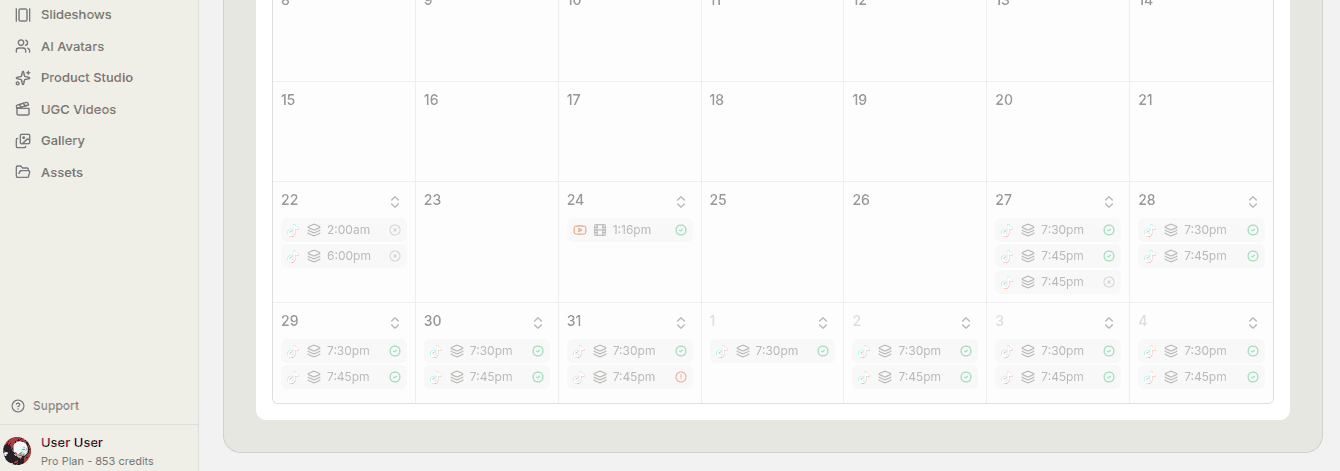
Most teams lose consistency because they plan content one post at a time.
That feels manageable at first. Then the week gets busy, one post slips, the queue disappears, and the account is back to reactive publishing.
A monthly planning session fixes that.
Quick Answer
If you want to plan a month of TikTok content in one sitting, use this order:
- pick a small set of repeatable content angles
- batch the assets around those angles
- assign formats to the calendar
- leave a little room for flexible posts
- schedule the best posts immediately
The goal is not to predict every post perfectly. The goal is to stop rebuilding the strategy from scratch every day.
Step 1: Pick 3 to 5 Repeatable Content Angles
A monthly calendar gets easier the moment you stop inventing every post from zero.
Choose a small set of content buckets that can repeat without feeling stale. For this kind of workflow, simple is better than clever.
That might mean:
- product-led slideshows
- founder lessons
- customer pain-point posts
- UGC-style demos
- opinion hooks tied to your niche
If you can name the same angle ten different ways, it is a strong candidate for the month.
If every angle feels one-off and fragile, the calendar will always be harder to fill.
Step 2: Batch the Assets Around Those Angles
Once the angles are set, batch the assets.
This is where momentum shows up. Instead of building a post from scratch every time, you create reusable material in one pass:
- image sets
- product visuals
- demos
- captions
- hook lists
- slideshow drafts
This is also where organized asset storage starts paying off. If your products, characters, demos, and finished drafts are easy to find, a monthly planning session moves much faster.
Step 3: Build the Calendar by Format, Not Just by Topic
Do not just list topics in a document. Put actual post formats onto the calendar.
That means thinking about how the month is distributed:
- which days get slideshows
- which days get UGC videos
- which posts are lighter and easier to produce
- which posts deserve your strongest slots
This avoids a very common planning mistake, a month full of ideas that have never been translated into actual post shapes.
A real content calendar needs more than subjects. It needs publishable units.
Step 4: Leave Space for Fast Reactions
A good monthly plan still leaves room for movement.
You do not need to schedule every slot with military precision. In fact, that usually makes the calendar harder to use.
Leave a little space for:
- fast reactions
- better-than-expected ideas
- corrections to weak angles
- posts tied to a product update or launch
That flexibility keeps the calendar useful instead of rigid.
Step 5: Schedule the Best Posts While the Context Is Fresh
Once the assets and angles are mapped, schedule the finished posts immediately.
Do not leave them in a half-planned state. The faster a finished post moves into the calendar, the less likely it is to get lost in a folder or pushed back by other work.
This is one of the main benefits of planning the month in one sitting. The context is still fresh, so the decisions around timing, captions, and account placement are easier to make.
Common Mistakes
Trying to plan too many distinct angles
Too much variety makes the month harder to produce.
Filling the calendar with raw ideas instead of post-ready formats
Ideas are not scheduled posts.
Leaving no room for changes
A fully rigid plan usually breaks the first time priorities shift.
Batching assets without a calendar step
If the posts never move into the calendar, the planning session never finishes its job.
FAQ
How far ahead should I plan TikTok content?
One month is a good working window for most brands and operators. It is far enough ahead to reduce chaos without becoming difficult to adjust.
Do I need every post ready before planning the month?
No. You need the angles, the asset direction, and enough finished posts to start filling the calendar.
How many content buckets should I use?
Usually three to five. More than that often adds complexity without improving output.
Final Take
Planning a month of TikTok content in one sitting works because it reduces daily decision fatigue.
You stop asking what to post every morning and start asking how to improve a calendar that already exists. That is a much better operating position, especially when the goal is consistent short-form output.
Related tools
If you want to turn this topic into something usable right now, start with these tools.
Content Angle Generator
Generate content angles you can turn into hooks, captions, slideshows, or scripts.
Free Caption Formatter
Format TikTok and Instagram captions with cleaner spacing and line breaks. Keep your original wording, review the result, and copy it for posting.
Instagram Caption Generator
Create Instagram caption drafts for stories, lessons, launch posts, and offers.
Slideshow Outline Generator
Create carousel and slideshow outlines for educational, promotional, and story-led posts.
Related reading
- How Often Should You Post TikTok Slideshows?
A strong posting cadence gives the account enough repetition to learn without pushing the creative standard downhill.
- How to Go From Idea to Scheduled TikTok Post Faster
The fastest workflow is not the one with the fewest steps. It is the one where the handoffs between those steps create the least friction.
- TikTok Post Scheduler: What Actually Matters Before You Choose a Tool
Most scheduler comparisons focus on feature lists. The better comparison is how fast the tool gets you from finished content to a clean publish calendar.
Related comparisons
- Best AI UGC Video Tools for Short-Form Content
A buying guide to AI UGC video tools, with ReelsFarm positioned for complete short-form content workflows.
- Best TikTok Automation Tools for Content Teams
A guide to TikTok automation tools for teams that need content creation, scheduling, publishing, and creative control.
- Best AI Slideshow Makers for TikTok
A guide to AI slideshow makers for TikTok, with ReelsFarm positioned for repeatable slideshow automation.
- Best AI UGC Tools for Ecommerce Brands
A source-checked guide to six AI UGC tools for ecommerce product content and publishing workflows.
Drive traffic to what matters on autopilot.
Create standout posts, line up your calendar, and publish consistently without juggling a dozen tools.