
How to Go From Idea to Scheduled TikTok Post Faster
· Workflow · 8 min read · Reels Farm Team
Content teams usually lose time in the gaps between idea, creation, and scheduling. Tightening those handoffs is one of the easiest ways to publish more without lowering standards.
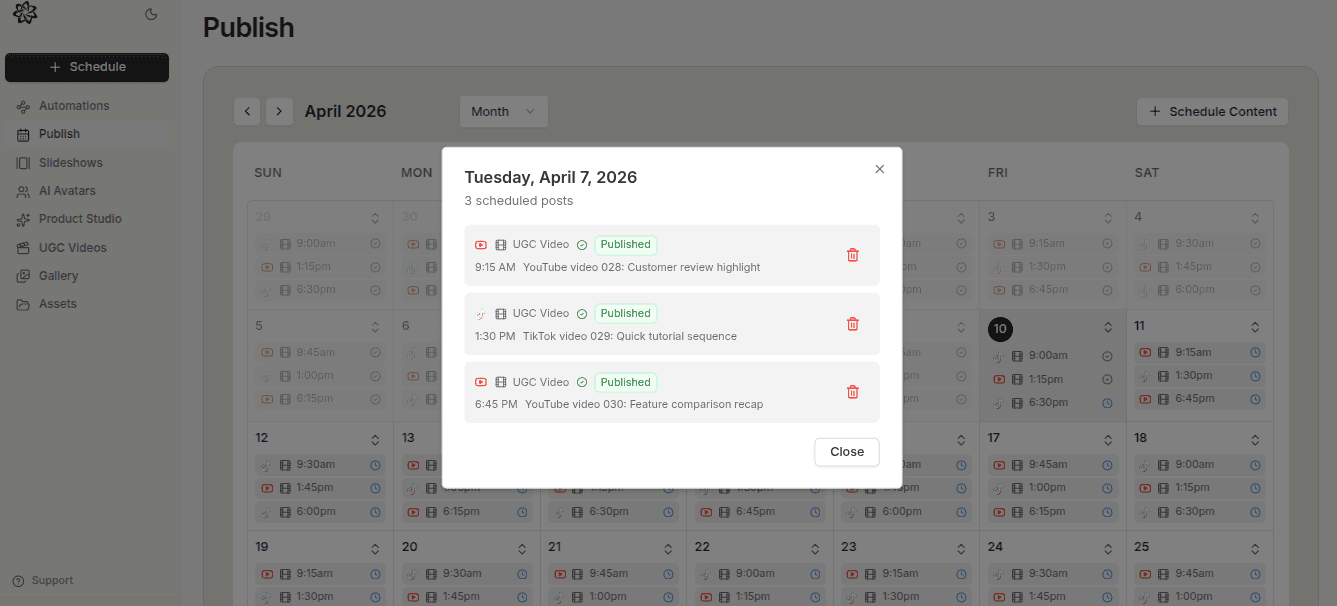
Most content workflows are slower than they need to be.
Not because the tools are always bad. Not because the team lacks ideas. The slowdown usually lives in the handoffs between steps.
The idea exists. The asset is half-built. The caption is waiting. The scheduling gets delayed. The post slips into next week.
Quick Answer
If you want to go from idea to scheduled TikTok post faster, do this:
- start with repeatable content formats
- choose the format early
- build the post while the angle is still fresh
- schedule it immediately after the final review
Speed improves when the handoffs get cleaner.
Step 1: Start with Repeatable Idea Formats
The fastest teams do not invent the format from scratch each time.
They already know the kinds of ideas they publish:
- slideshow breakdown
- product-led angle
- UGC demo
- founder lesson
- opinion hook
That means the idea only has to answer one question first, which bucket does this belong to?
Once that answer is clear, the rest of the workflow gets simpler.
Step 2: Choose the Format Early
A lot of workflow drag comes from deciding the format too late.
If the idea should become a slideshow, say that immediately. If it needs a UGC video, decide that up front too. Early format choice affects:
- what assets are needed
- how the hook should be written
- how the post will be edited
- how it should move into scheduling
Ambiguity here slows everything down.
Step 3: Build While the Context Is Still Fresh
Once the idea is clear, move quickly into production.
This is where small delays start to add up. If the post sits too long between idea and build, the original sharpness often gets weaker. The hook becomes flatter, the visual direction gets muddier, and the whole thing takes longer to finish.
That is why a tighter workflow often produces better creative too. The logic of the post is still alive while it is being built.
Step 4: Schedule It Immediately After Final Review
Do not leave finished posts sitting in a private queue longer than necessary.
The moment the post is done, the ideal next step is scheduling. That keeps the workflow linear:
idea -> build -> review -> schedule
The more often finished posts wait around unscheduled, the more often the queue starts breaking apart.
Step 5: Keep a Small Backlog
You do not need a massive backlog.
You do need enough of one that the team is not rebuilding the pipeline from zero every day. A small scheduled queue reduces pressure and makes it easier to keep standards high.
That backlog is what turns a frantic workflow into a calmer one.
Common Mistakes
Delaying format choice
This creates uncertainty that slows the whole post.
Letting finished content sit unscheduled
That breaks the flow from creation into publishing.
Switching contexts too often
Frequent context switching makes even simple posts feel heavier.
FAQ
What is the biggest source of workflow drag?
Usually the handoff between steps, not the steps themselves.
Should scheduling happen the same day the post is finished?
Often yes. That keeps the workflow tight and lowers the odds of content getting lost.
Does faster workflow reduce quality?
Not if the speed comes from better structure rather than rushed judgment.
Final Take
The fastest path from idea to scheduled TikTok post is usually the clearest one.
Repeatable formats, early format decisions, tighter handoffs, and immediate scheduling all help the workflow move with less wasted motion. That is the kind of speed that actually holds up.
Related tools
If you want to turn this topic into something usable right now, start with these tools.
Content Angle Generator
Generate content angles you can turn into hooks, captions, slideshows, or scripts.
Free Caption Formatter
Format TikTok and Instagram captions with cleaner spacing and line breaks. Keep your original wording, review the result, and copy it for posting.
Instagram Caption Generator
Create Instagram caption drafts for stories, lessons, launch posts, and offers.
Related reading
- How to Plan a Month of TikTok Content in One Sitting
The easiest way to stay consistent is to stop planning day by day. A monthly content pass creates a calmer workflow and a stronger publishing rhythm.
- How to Schedule TikTok Posts in 2026
Scheduling works best when the content is finished, the account is clear, and the calendar is reviewed before the week fills up.
- 8 GPT Image 2.5 Workflows for Social Media Content
Use GPT Image 2.5 as part of a repeatable content system, not as a one-off image generator, with eight workflows for common social jobs.
Related comparisons
- Best AI UGC Video Tools for Short-Form Content
A buying guide to AI UGC video tools, with ReelsFarm positioned for complete short-form content workflows.
- Best TikTok Automation Tools for Content Teams
A guide to TikTok automation tools for teams that need content creation, scheduling, publishing, and creative control.
- Best AI Slideshow Makers for TikTok
A guide to AI slideshow makers for TikTok, with ReelsFarm positioned for repeatable slideshow automation.
- Best AI UGC Tools for Ecommerce Brands
A source-checked guide to six AI UGC tools for ecommerce product content and publishing workflows.
Drive traffic to what matters on autopilot.
Create standout posts, line up your calendar, and publish consistently without juggling a dozen tools.