
How to Add On-Screen Text to UGC Videos Without Cluttering the Edit
· UGC Video · 8 min read · Reels Farm Team
On-screen text can improve clarity in UGC videos, but it becomes a liability when every frame starts carrying a paragraph. The best overlays support the edit without turning it into a reading exercise.
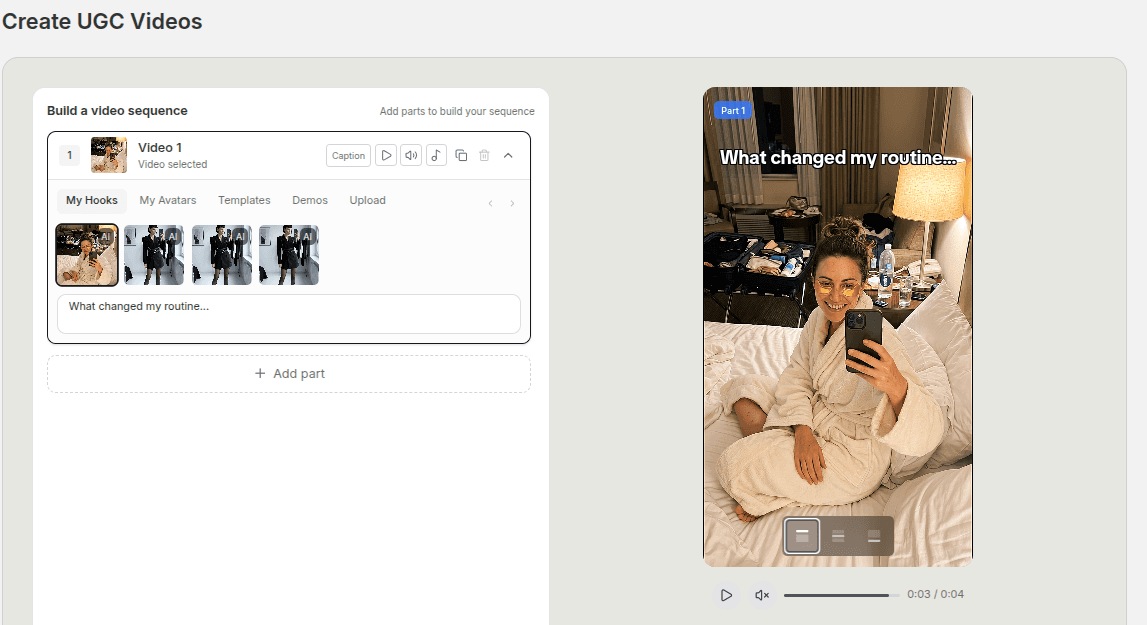
On-screen text is one of the easiest ways to improve a UGC video.
It is also one of the easiest ways to ruin one.
The reason is simple. Text is powerful. It tells the viewer where to look, what to think, and how to interpret the shot. But the moment you use too much of it, the footage starts feeling secondary.
Quick Answer
Good on-screen text in UGC videos usually follows four rules:
- every line has one job
- each line stays short
- placement respects the shot
- anything the footage already proves gets removed
The goal is not to decorate the frame. The goal is to make the message easier to process.
Step 1: Decide What the Text Needs to Do
Not every line belongs in the same category.
In short-form UGC, text usually serves one of three functions:
- opening the hook
- clarifying the demo
- reinforcing the payoff
If you know which role the text is playing, you can write it more clearly.
For example, hook text should create a reason to stay. Demo text should help the viewer understand what they are seeing. Payoff text should sharpen the conclusion.
What creates clutter is when the same line tries to do all three at once.
Step 2: Keep Each Line Short
The feed moves quickly.
Even when viewers pause, they are still deciding fast whether the content feels worth their attention.
That is why long text blocks usually hurt more than they help. The viewer has to choose between reading and watching. If they cannot do both easily, the edit starts feeling heavy.
Shorter lines solve a lot of problems:
- better readability
- cleaner pacing
- stronger emphasis
- less overlap with the footage
As a general rule, cut until the line feels hard to misread.
You are not writing subtitles for a lecture. You are writing support for a short-form sequence.
Step 3: Match the Text to the Shot
Placement matters almost as much as writing.
If the text covers the product, sits on top of a busy visual, or changes position for no good reason, the whole edit feels less controlled.
A clean overlay should respect:
- the product
- the face if someone is speaking on screen
- the natural focal point of the shot
- the safe area of the frame
This matters even more in modular UGC workflows because different parts may have different compositions. One part may need top-aligned text. Another may need lower placement. Another may need no overlay at all.
Per-part control helps, but only if you use it thoughtfully.
Step 4: Remove Redundant Text
This is the edit most people skip.
They write a line, it looks useful, and it stays.
Do another pass and ask a harder question: is the footage already telling me this?
If the demo clearly shows the product going on smoothly, you may not need text that says "goes on smoothly."
If the hook already frames the problem, you may not need two more lines explaining the same problem in slightly different words.
Redundancy is one of the main reasons UGC text starts feeling crowded.
Step 5: Let Different Parts Carry Different Weight
A modular UGC video becomes stronger when the text load changes across the sequence.
One part may carry a clear hook line.
The next part may only need a short label.
The product demo may need one clarifying phrase.
The ending may need one short conclusion.
This variation creates breathing room. It keeps the viewer from feeling like every frame is competing for cognitive space.
When every part has the same amount of text, the sequence often feels flatter and harder to process.
Step 6: Make the Overlay Sound Human
Even when the placement is clean, the wording can still make the edit feel artificial.
The same rule from hook writing applies here. Use language that feels closer to speech:
- fewer stacked clauses
- fewer broad claims
- fewer polished marketing phrases
- more direct wording
The strongest overlay often sounds like the simplest version of the thought, not the smartest-sounding version.
Common Mistakes
Putting text on every part
Some parts are stronger without an overlay.
Writing full sentences when a short phrase would do
Long text slows the sequence down.
Covering the product or face
Placement can ruin otherwise useful copy.
Repeating what the footage already proves
This is one of the biggest causes of clutter.
FAQ
Should every UGC video include on-screen text?
No. Some edits are clearer with it. Some are stronger without much overlay at all.
How long should each line be?
Short enough to process quickly. In most cases, shorter is better if meaning stays clear.
Should captions and overlays say the same thing?
Usually no. Let each layer do a different job.
Final Take
On-screen text works best when it behaves like support, not like a second script pasted over the footage.
Shorter lines, cleaner placement, and stronger editing judgment usually do more than fancy styling. If your workflow gives you control over each part's text and position, use that control to simplify the edit, not to crowd it.
Related tools
If you want to turn this topic into something usable right now, start with these tools.
UGC Script Generator
Build UGC-style script outlines for testimonials, demos, and problem-solution videos.
TikTok Hook Generator
Generate TikTok hook ideas for product demos, lessons, and founder-led content.
TikTok Caption Generator
Create short TikTok captions for demos, lessons, proof posts, and quick takes.
Free Caption Formatter
Format TikTok and Instagram captions with cleaner spacing and line breaks. Keep your original wording, review the result, and copy it for posting.
Related reading
- How to Create UGC Videos With AI That Still Feel Native
Native-feeling UGC usually comes from a stronger angle, tighter sequencing, and cleaner text, not from adding more pieces.
- How to Build a UGC Video From Hooks, Demos, and Product Clips
The cleanest UGC workflow starts with the hook, places the demo with intent, and only keeps the supporting clips that move the story forward.
- 5 Beauty Salon Video Ideas With Hooks and Real Demos
Show consultations, gift sets, vouchers, and arrival information through short videos built from checked salon footage.
Related comparisons
- Best AI UGC Video Tools for Short-Form Content
A buying guide to AI UGC video tools, with ReelsFarm positioned for complete short-form content workflows.
- Best TikTok Automation Tools for Content Teams
A guide to TikTok automation tools for teams that need content creation, scheduling, publishing, and creative control.
- Best AI Slideshow Makers for TikTok
A guide to AI slideshow makers for TikTok, with ReelsFarm positioned for repeatable slideshow automation.
- Best AI UGC Tools for Ecommerce Brands
A source-checked guide to six AI UGC tools for ecommerce product content and publishing workflows.
Drive traffic to what matters on autopilot.
Create standout posts, line up your calendar, and publish consistently without juggling a dozen tools.