
How to Build a Reusable AI Avatar Library for Content Teams
· AI Avatars · 8 min read · Reels Farm Team
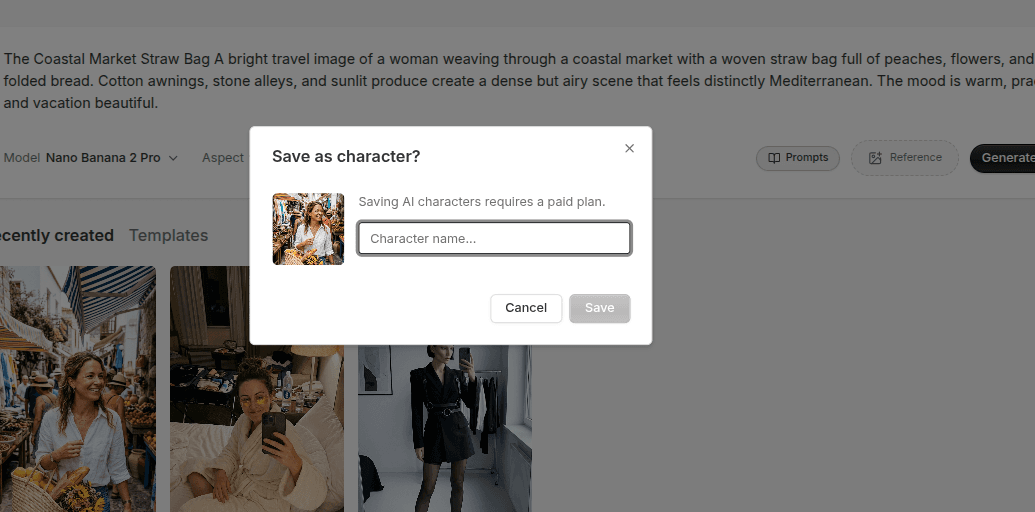
Teams waste a lot of time regenerating avatars they already solved once. A reusable library turns strong characters into production assets that can support more than one campaign.
An avatar workflow gets expensive long before money becomes the issue.
It gets expensive in time.
If every new request starts with browsing, generating, comparing, and rediscovering the same type of character again, the system is leaking effort constantly. A reusable avatar library fixes that.
Quick Answer
To build a reusable AI avatar library:
- save characters with clear creative roles
- name and organize them consistently
- keep the references and prompt patterns that made them work
- remove weak or redundant characters regularly
The point of the library is speed through clarity, not volume through accumulation.
Step 1: Save Characters With a Purpose
Do not save avatars just because they look good.
Save them because they can do a job.
Useful avatar roles might include:
- product spokesperson
- creator-style recommendation character
- lifestyle brand character
- beauty campaign character
- ecommerce support character
Role-based thinking makes the library easier to use later because the team is not searching through random faces. They are selecting from known creative functions.
Step 2: Name and Tag Characters Clearly
A library becomes messy much faster than people expect.
Clear naming solves a lot:
- character role
- visual style
- campaign fit
- product category fit
Even a simple naming standard beats relying on memory.
The goal is that another person on the team can open the library and understand why a character exists without needing a long explanation.
Step 3: Keep the Winning Inputs Attached
The avatar alone is not the full asset.
The full asset also includes:
- strong references
- the winning prompt pattern
- notes on what kind of creative the character fits
This matters because reuse gets weaker when the context disappears. If the team can see the character but cannot recover the logic that produced them, consistency work gets harder later.
Step 4: Curate the Library Regularly
More saved characters do not automatically improve the workflow.
In fact, large uncurated libraries often slow teams down because every selection step turns into browsing again.
A better library keeps:
- the strongest characters
- the most reusable roles
- the clearest brand fits
And it removes:
- duplicates
- weak near-misses
- characters that never became useful
The best library often feels smaller and sharper than expected.
Step 5: Separate Exploration From Production
This is a helpful mental model.
Exploration is where you test new avatar directions.
Production is where proven characters live.
If both sit in the same pool forever, the library gets noisy. A cleaner system treats saved reusable characters as production assets and keeps experimentation from polluting the working set.
Step 6: Use the Library to Speed Up Real Work
A reusable library should make common tasks easier:
- selecting a character for a campaign
- generating consistent new creative
- pairing avatars with products
- refreshing ad variations
If the library is not making those jobs faster, it may be too messy or too broad.
The goal is operational leverage. The team should spend less time hunting and more time building.
What Metadata Is Worth Keeping
Even a simple library becomes much more useful when each character carries a little context.
Helpful metadata can include:
- the role of the character
- the product categories they fit best
- the references tied to them
- the prompt pattern that produced the strongest results
- any notes on how to keep them consistent
You do not need a complicated system to benefit from this. You just need enough context that the character stays easy to reuse later.
Common Mistakes
Saving everything
This is the fastest path to a noisy library.
Naming characters poorly
If the labels do not explain usage, reuse becomes harder.
Dropping the references and prompt context
That weakens consistency over time.
Mixing exploration outputs with proven assets
That makes the library less trustworthy.
FAQ
How many characters should a team keep?
Enough to cover the real creative roles the brand needs, but not so many that selection becomes slow.
Should every brand have its own avatar library?
Usually yes, especially when tone, styling, and audience fit matter.
What makes a character worth keeping?
Strong brand fit, reuse potential, and enough flexibility to support more than one piece of creative.
When should a team retire a character?
Retire it when it no longer fits the brand, duplicates a stronger saved character, or never becomes useful in real campaign work.
Final Take
A reusable AI avatar library is less about storage and more about production discipline.
Save characters with a role, keep the inputs that made them work, organize them clearly, and remove the weak ones. Done well, the library becomes a creative accelerator instead of another folder full of forgotten generations.
Related tools
If you want to turn this topic into something usable right now, start with these tools.
Content Angle Generator
Generate content angles you can turn into hooks, captions, slideshows, or scripts.
Instagram Caption Generator
Create Instagram caption drafts for stories, lessons, launch posts, and offers.
CTA Generator
Create call-to-action lines for captions, carousels, videos, and offer-led posts.
Related reading
- How to Create AI Avatars for Ads Without Hiring Models
Better AI avatar ads come from stronger role definition, better references, and saving the characters that actually fit the brand.
- How to Keep Character Consistency Across AI Avatar Generations
Character consistency usually comes from reuse and control, not from hoping every generation will magically match the last one.
- 7 GPT Image 2.5 Editing Mistakes and Their Fixes
GPT Image 2.5 reference edits can change details you wanted to keep. A useful edit brief names both the requested change and the protected parts of the image.
Related comparisons
- Best AI UGC Video Tools for Short-Form Content
A buying guide to AI UGC video tools, with ReelsFarm positioned for complete short-form content workflows.
- Best TikTok Automation Tools for Content Teams
A guide to TikTok automation tools for teams that need content creation, scheduling, publishing, and creative control.
- Best AI Slideshow Makers for TikTok
A guide to AI slideshow makers for TikTok, with ReelsFarm positioned for repeatable slideshow automation.
- Best AI UGC Tools for Ecommerce Brands
A source-checked guide to six AI UGC tools for ecommerce product content and publishing workflows.
Drive traffic to what matters on autopilot.
Create standout posts, line up your calendar, and publish consistently without juggling a dozen tools.