
How to Create AI Avatars for Ads Without Hiring Models
· AI Avatars · 8 min read · Reels Farm Team
Many brands want creator-style ad visuals, but they do not want the friction of finding models, running shoots, and recreating the same look later. AI avatars can help, but only if the workflow is controlled enough to produce usable characters.
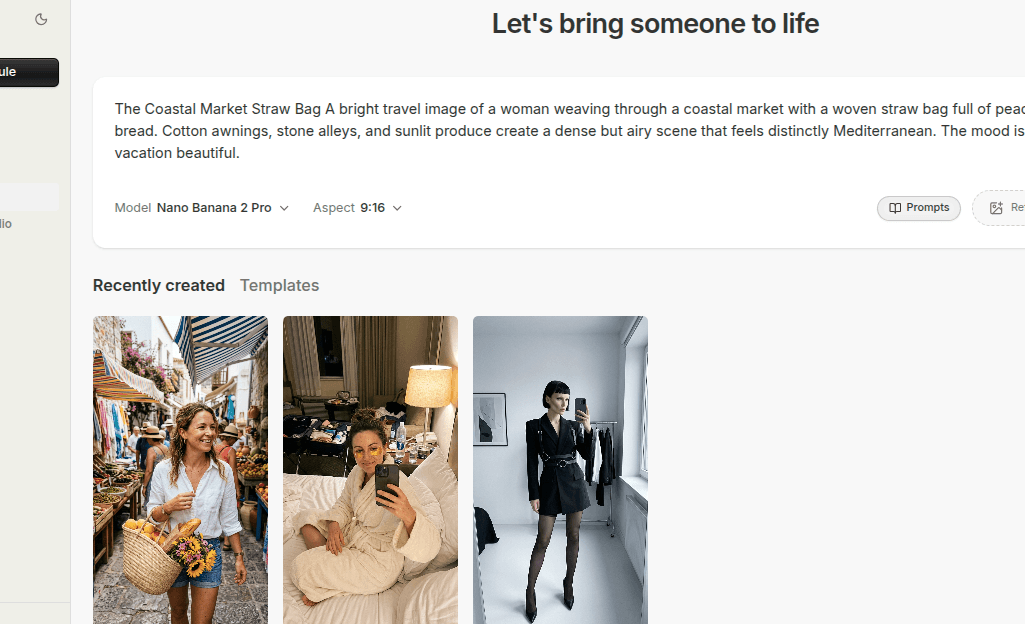
Hiring models is not the hard part.
The hard part is building a repeatable system around them.
You need scheduling, direction, styling, reshoots, and a way to recreate the same visual identity later. That is where AI avatars become attractive. They give content teams a way to generate creator-style visuals without rebuilding the production process every time.
Quick Answer
If you want to create stronger AI avatars for ads, focus on four things:
- define the role of the avatar before generating anything
- start with better prompts and better references
- save the characters that fit the brand
- build the final creative around the offer, not around the novelty of the avatar
The avatar is only useful if it helps produce better ad creative.
Step 1: Decide What Job the Avatar Needs to Do
Before you start generating, define the role.
Is the avatar supposed to feel like:
- a creator recommending the product
- a polished spokesperson
- a lifestyle model inside the target brand world
- a support visual for product-led creative
That decision shapes everything that follows.
A creator-style ad for a casual product will likely need a different character, styling direction, and framing than a premium ecommerce campaign or a beauty ad.
If you skip this step, you usually end up with visually decent outputs that do not really fit the offer.
Step 2: Start With Better Inputs
Generic prompts produce generic avatars.
That is one of the main reasons AI avatar workflows disappoint people early.
A stronger starting point usually includes:
- the role of the character
- the age or general presentation range
- the scene or use case
- the visual mood
- any important brand constraints
Reference images can improve this further. If you already know the kind of face, styling, or energy you want, references help narrow the output toward something more useful.
The point is direction, not volume.
Ten vague generations rarely beat three guided ones.
Step 3: Generate Several Options, Then Be Selective
Most teams make one of two mistakes here.
They either:
- keep too many weak characters
- or regenerate endlessly without saving the good ones
The better approach is to treat the first round like casting.
Generate a batch, review them against the brand, and keep only the characters that feel usable for real campaigns. Good character choices should answer obvious questions:
- does this person fit the product world?
- would this face work across more than one ad?
- does the styling feel repeatable?
- is the output strong enough that you would actually build creative around it?
If the answer is unclear, do not keep it just because it looks polished.
Step 4: Save the Characters That Work
This is where AI avatars become operationally useful.
If a generated character fits your brand or campaign, save it.
That changes the whole workflow. The character stops being a one-off result and becomes a reusable creative asset. Later, you can reference the same character again when you want better consistency across several images or campaigns.
Without that step, you stay in discovery mode forever.
With it, you start building a real avatar library.
Step 5: Build the Final Ad Around the Offer
An AI avatar is not automatically an ad.
It is one ingredient inside an ad.
The final creative still needs to support the offer:
- what is being sold
- who it is for
- what visual context supports the message
- whether the product should appear directly
This is where many teams go wrong. They focus so much on making a beautiful avatar that they forget the commercial job of the image.
The avatar should help frame the offer, not distract from it.
Step 6: Think in Systems, Not Single Images
The real value of AI avatars appears when the output becomes reusable.
One strong avatar can support:
- several ad images
- product-led variants
- campaign refreshes
- consistent creator-style visuals across a content set
That is more useful than chasing a different face every time.
In practice, the strongest teams do not treat avatar generation like endless exploration. They treat it like asset building.
Common Mistakes
Generating characters without a role
This creates pretty results with weak commercial fit.
Using vague prompts
Weak direction leads to weak output.
Failing to save strong characters
If you do not keep the winners, you lose one of the biggest advantages of the workflow.
Treating the avatar as the whole ad
The product, scene, and offer still need to land.
FAQ
Are AI avatars good enough for real ad creative?
They can be, especially when the workflow is guided by product fit and strong creative direction instead of novelty.
Should every brand use the same avatar style?
No. The right style depends on the product, audience, and the kind of trust the creative needs to build.
How many avatars should a brand keep?
Enough to cover different roles clearly, but not so many that the library becomes random and hard to use.
Final Take
Creating AI avatars for ads works best when the process feels closer to casting and asset building than blind generation.
Define the role, guide the output with better prompts and references, save the characters that fit, and build the final ad around the offer. That is what turns avatar generation into a real creative workflow instead of a novelty tool.
Related tools
If you want to turn this topic into something usable right now, start with these tools.
Content Angle Generator
Generate content angles you can turn into hooks, captions, slideshows, or scripts.
Instagram Caption Generator
Create Instagram caption drafts for stories, lessons, launch posts, and offers.
CTA Generator
Create call-to-action lines for captions, carousels, videos, and offer-led posts.
Related reading
- How to Create Professional LinkedIn Photos Without Hiring a Photographer
Professional LinkedIn photos work when they look clear, current, trustworthy, and appropriate for the role you want to signal.
- How to Keep Character Consistency Across AI Avatar Generations
Character consistency usually comes from reuse and control, not from hoping every generation will magically match the last one.
- 5 AI Avatar Prompt Templates for Product Images
A product-focused AI avatar prompt should describe the character's role, the product's placement, the scene, and the final crop. A portrait prompt alone leaves those commercial requirements unspecified.
Related comparisons
- Best AI UGC Video Tools for Short-Form Content
A buying guide to AI UGC video tools, with ReelsFarm positioned for complete short-form content workflows.
- Best TikTok Automation Tools for Content Teams
A guide to TikTok automation tools for teams that need content creation, scheduling, publishing, and creative control.
- Best AI Slideshow Makers for TikTok
A guide to AI slideshow makers for TikTok, with ReelsFarm positioned for repeatable slideshow automation.
- Best AI UGC Tools for Ecommerce Brands
A source-checked guide to six AI UGC tools for ecommerce product content and publishing workflows.
Drive traffic to what matters on autopilot.
Create standout posts, line up your calendar, and publish consistently without juggling a dozen tools.