
How to Schedule TikTok Posts in 2026
· TikTok Scheduling · 8 min read · Reels Farm Team
Scheduling TikTok posts is easy in theory. Keeping the scheduling workflow clean across real content, real accounts, and a real calendar is where the work actually is.
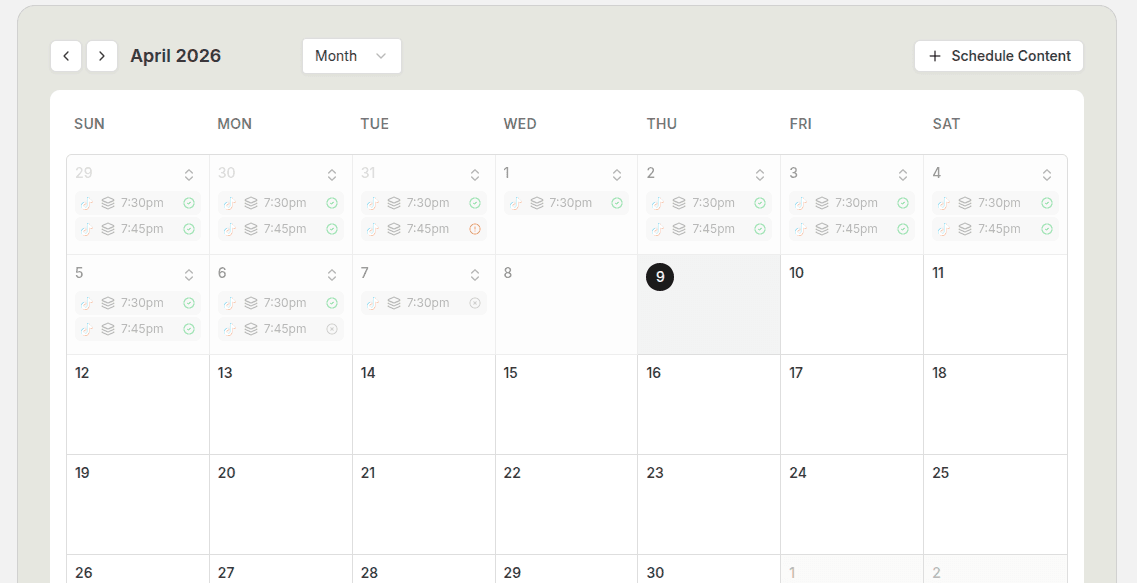
Scheduling TikTok posts sounds easy until you are doing it every week across multiple formats, multiple accounts, and a real content calendar.
That is where most teams slow down. The content might be ready, but the post still has to be assigned to the right account, given a clean caption, placed at the right time, and reviewed inside the bigger monthly plan.
Quick Answer
If your content is already ready, scheduling a TikTok post should take only a few minutes:
- Finalize the post.
- Open the publish calendar.
- Choose the date and time.
- Set the timezone.
- Select the destination TikTok account.
- Add or review the caption.
- Check the TikTok-specific settings.
- Review the month view so your cadence still makes sense.
The part that usually causes trouble is everything around the schedule button. Weak captions, wrong account selection, a messy posting rhythm, or trying to schedule content that was never strong enough to post in the first place all make the workflow feel heavier than it should.
Step 1: Prepare the Content Before You Touch the Calendar
Do not start in the calendar.
Start with the post itself.
For TikTok, that means the creative should already be in a final or near-final state before you schedule it. If you are working with slideshows, the slides should be edited, the opening frame should be strong, and the text should be clean enough to publish. If you are working with UGC videos, the hook, sequence, and on-screen text should already be set.
This sounds obvious, but a lot of teams use the scheduling step as a placeholder for unfinished work. That creates a pile of posts on the calendar that still need edits, which defeats the whole point.
Before a post gets scheduled, check four things:
- The format is finalized.
- The first frame or first seconds are good enough to earn attention.
- The caption fits the post.
- The post belongs to the account you are scheduling it for.
If you skip that last point, multi-account scheduling gets messy fast.
Step 2: Add the Post to the Publish Calendar
Once the content is ready, move it into the publish workflow.
The clean way to do this is through a calendar-based scheduling view, because it lets you see each post inside the bigger plan. A list can tell you what is scheduled. A calendar shows whether your schedule actually makes sense.
In a proper TikTok scheduling flow, you should be able to:
- choose the content type
- select the finished asset
- assign a publishing date
- assign an exact time
- set the correct timezone
- select the destination account
- review the caption and publishing settings
This is the point where workflow quality starts to matter.
If the path from finished content to scheduled post is clumsy, you will feel it immediately. Teams end up delaying scheduling, leaving posts unslotted until the last minute, or posting manually because the calendar step feels like friction.
Step 3: Set the Right Publish Details
The date is easy. The details around the date are what matter.
Timezone is the first one. If the timezone is wrong, the rest of the schedule can look perfect and still publish at the wrong hour. That matters even more when you are running content for clients, separate brands, or audiences in different regions.
Destination account is the second. Always verify the account before saving the post. One wrong destination turns a clean workflow into a cleanup job.
Caption is the third. Do not treat the caption like a placeholder. For many TikTok posts, especially slideshows, the caption is a support layer. It does not need to carry the whole post, but it should reinforce the angle, clarify the subject, or support the CTA.
If your scheduler exposes TikTok-specific post settings, review them every time instead of assuming the defaults are always right.
Step 4: Review the Calendar for Gaps and Collisions
This is the step a lot of people skip.
They schedule the post, close the modal, and move on.
That is fine if you publish once in a while. It is not fine if you are building a real content rhythm.
After each post is scheduled, zoom back out and look at the calendar:
- Are two similar posts sitting too close together?
- Is one week overloaded while the next one is empty?
- Are you repeating the same angle three times in a row?
- Are your strongest posts stacked on the same day?
The month view is especially useful because it shows whether the plan feels balanced at a glance. The week and day views matter too, but the month view is where distribution problems become obvious.
One of the fastest ways to make a TikTok content strategy look disorganized is to bunch content together in bursts and then disappear for long gaps. A calendar review fixes that before the post ever goes live.
What a Good TikTok Scheduling Workflow Looks Like
A good scheduling workflow feels predictable.
You know where the content lives. You know how it gets reviewed. You know how it moves into the calendar. You know which account it belongs to. You know who needs to look at it before it goes live.
For most teams, the strongest workflow looks like this:
- Create the content in batches.
- Edit the strongest pieces first.
- Finalize captions while the post is still fresh.
- Schedule immediately after final review.
- Review the calendar once more at the week or month level.
That last step matters more than people think.
Common Mistakes
Scheduling content that was never validated manually
If the format has never worked, scheduling more of it does not help.
Ignoring timezone details
This is one of the easiest mistakes to make and one of the most annoying to fix after the fact.
Treating the caption like a placeholder
If the post is strong and the caption feels lazy, the whole post feels less intentional.
Forgetting to review the month view
A post can be scheduled correctly and still be placed badly inside the bigger calendar.
FAQ
How far in advance should I schedule TikTok posts?
For most teams, one to two weeks is enough to stay ahead without losing flexibility. If you already have a stable format and a reliable review process, it is reasonable to plan a full month at a time.
Should I schedule every TikTok post?
Not necessarily. Scheduling is best for planned content, repeatable formats, and posts that fit into a bigger calendar. Reactive posts, quick tests, or trend responses may still deserve a more manual workflow.
What should I schedule first?
Start with the formats that are easiest to repeat without lowering quality. Slideshows are often a strong first candidate. Recurring educational posts, product-led posts, and repeatable UGC sequences also make sense.
Can I manage multiple TikTok accounts from one workflow?
Yes, as long as account selection is clear and the calendar gives you enough visibility to see what is going where.
When should I automate instead of just scheduling manually?
Automate after the format is already working. Manual scheduling is usually the better starting point. Automation is strongest when it is scaling a format you already trust.
Final Take
Scheduling TikTok posts is not hard.
Keeping the scheduling workflow clean is the hard part.
The teams that get the most value out of scheduling are usually the ones that handle the basics well: finished content, clear account ownership, clean captions, correct timezone settings, and a real calendar review before the week fills up.
If you already create slideshows, UGC videos, or recurring short-form posts, the next step is to make the path from finished content to scheduled publish as smooth as possible.
Related tools
If you want to turn this topic into something usable right now, start with these tools.
Content Angle Generator
Generate content angles you can turn into hooks, captions, slideshows, or scripts.
Free Caption Formatter
Format TikTok and Instagram captions with cleaner spacing and line breaks. Keep your original wording, review the result, and copy it for posting.
Instagram Caption Generator
Create Instagram caption drafts for stories, lessons, launch posts, and offers.
Related reading
- TikTok Slideshow Format: A 6-Slide Product Example
A practical product-led TikTok slideshow can use six slides: problem, context, method, example, product role, and next action. Treat this as a starting structure, not a claim that six slides always perform best.
- How to Manage Multiple TikTok Accounts in One Workflow
Manage multiple TikTok accounts by keeping their audiences, assets, captions, and publishing destinations explicit. A shared calendar helps only when every post is tied to the correct account and approved file.
- TikTok Post Scheduler: What Actually Matters Before You Choose a Tool
Most scheduler comparisons focus on feature lists. The better comparison is how fast the tool gets you from finished content to a clean publish calendar.
- How Often Should You Post TikTok Slideshows?
A strong posting cadence gives the account enough repetition to learn without pushing the creative standard downhill.
Related comparisons
- Best AI UGC Video Tools for Short-Form Content
A buying guide to AI UGC video tools, with ReelsFarm positioned for complete short-form content workflows.
- Best TikTok Automation Tools for Content Teams
A guide to TikTok automation tools for teams that need content creation, scheduling, publishing, and creative control.
- Best AI Slideshow Makers for TikTok
A guide to AI slideshow makers for TikTok, with ReelsFarm positioned for repeatable slideshow automation.
- Best AI UGC Tools for Ecommerce Brands
A source-checked guide to six AI UGC tools for ecommerce product content and publishing workflows.
Drive traffic to what matters on autopilot.
Create standout posts, line up your calendar, and publish consistently without juggling a dozen tools.