
How to Make Product-Led Social Images Without a Studio Shoot
· Product Studio · 8 min read · Reels Farm Team
Many brands need social-ready product creative long before they have the time or budget for a full studio session. The answer is not lower standards. It is a tighter workflow around product assets, scene direction, and repeatable variation.
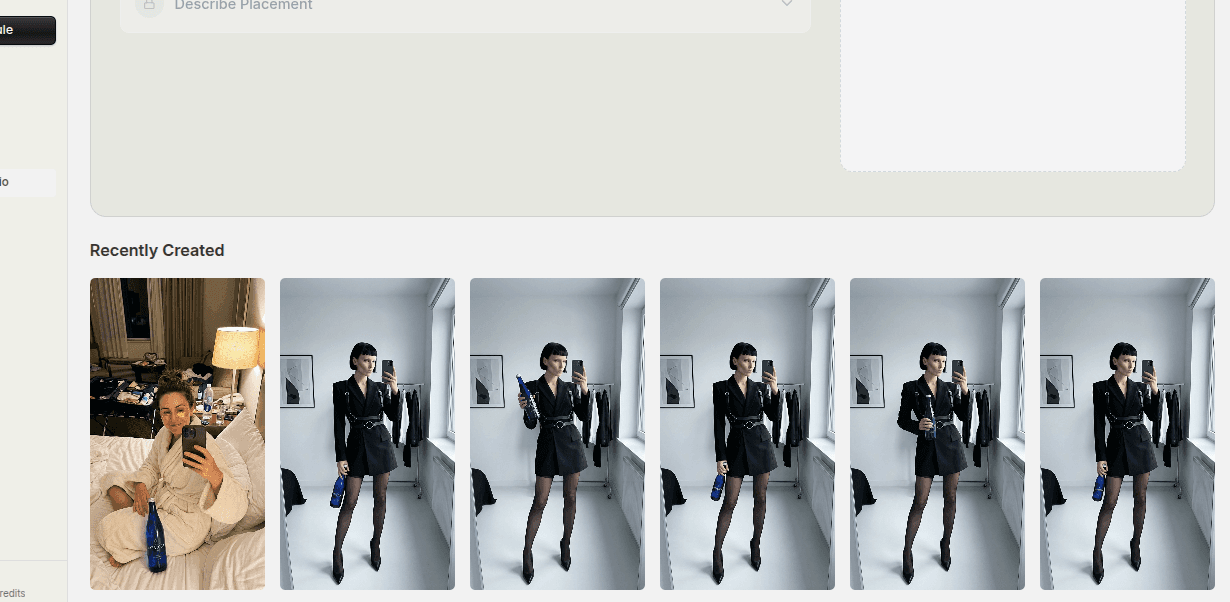
Studio shoots are useful, but they are not always available at the moment the content team actually needs creative.
That leaves many brands with a familiar problem. They need social images now, but the full production workflow is still far away.
Product-led image systems help solve that gap when they are built carefully.
Quick Answer
To make better product-led social images without a studio shoot:
- start with the product asset, not the background
- choose a visual direction that matches the offer
- add human context only when it improves the message
- build a small set of purposeful variations
The image should still feel product-first, even when the scene around it does more of the storytelling.
Step 1: Start With the Product, Not the Backdrop
The product is the reason the image exists.
That sounds obvious, but many weak social images reverse the order. The team starts with a mood board, a trendy background, or a lifestyle scene and then tries to fit the product into it later.
That usually weakens the result.
A stronger process starts by asking:
- what needs to be visible?
- what part of the product is most recognizable?
- does packaging matter?
- does the product need to look hero-sized or more naturally placed?
Once those answers are clear, the rest of the scene can support the product instead of competing with it.
Step 2: Match the Visual Direction to the Offer
Different offers need different image logic.
A launch image, a sale image, and a founder-led educational post should not all look the same.
Useful visual directions might include:
- clean launch framing
- soft lifestyle context
- product plus creator-style human presence
- seasonal offer styling
- ecommerce-first hero treatment
The goal is alignment. The image should help the viewer understand what kind of message they are about to receive.
Step 3: Add Human Context Only When It Helps
Hands, avatars, or environmental cues can make a product image feel more alive.
But they should be used with a reason.
Human context helps when it:
- shows scale
- makes the product feel more relatable
- clarifies how it is used
- increases creator-style appeal
It hurts when it:
- pulls attention away from the product
- makes the image too crowded
- introduces a human figure with no role in the message
The product should still remain central after the human layer is added.
Step 4: Build in Batches
One image is rarely enough.
If you already have the product asset and the creative direction, build a small set:
- one cleaner hero version
- one lifestyle-leaning version
- one variation tied to a specific offer
That gives the team more flexibility for:
- social posting
- slideshow creative
- paid ad testing
- campaign refreshes
Batching also helps prevent a common problem. The team makes one decent image, then has to restart the process from scratch for the next asset.
Step 5: Keep the Background Under Control
Backgrounds matter, but they should not become the story unless that is the point of the creative.
The best supporting backgrounds usually:
- reinforce the offer
- fit the brand
- leave the product easy to read
- avoid unnecessary visual noise
If the background is louder than the product, the composition has probably drifted too far.
Step 6: Review the Image in Feed Terms
A product-led image should survive quick scanning.
Ask:
- can I tell what the product is quickly?
- is the product still the focal point?
- does the scene help the offer?
- could this image support an organic post or ad without major changes?
That last check matters because the strongest product-led images are versatile. They can support several publishing needs instead of solving only one.
Common Mistakes
Letting the visual concept overpower the product
The product should still lead the frame.
Starting with a scene instead of a product need
This often creates forced compositions.
Adding human context with no message benefit
That usually makes the image busier without making it better.
Building one image when the workflow could support several
You usually get more value by creating a small set.
FAQ
Can product-led social images work without people in them?
Yes. Many do. Human context helps in some cases, but it is not required for every good product image.
Are these images only for organic social?
No. Strong product-led images can also support ads, slideshow assets, and campaign refreshes.
What makes a product-led image feel generic?
Weak product focus, background-first composition, and visual direction that does not connect to a real offer.
Final Take
You do not need a studio shoot to make useful product-led social images.
You need a stronger order of decisions. Start from the product, pick a visual direction that matches the offer, use human context only when it helps, and build a small set of assets that can support more than one publishing need.
Related tools
If you want to turn this topic into something usable right now, start with these tools.
Content Angle Generator
Generate content angles you can turn into hooks, captions, slideshows, or scripts.
Instagram Caption Generator
Create Instagram caption drafts for stories, lessons, launch posts, and offers.
CTA Generator
Create call-to-action lines for captions, carousels, videos, and offer-led posts.
Related reading
- How to Generate Product Marketing Images for Launches and Offers
Launch-ready product images work better when the offer, product, and scene are planned together from the start.
- How to Create Pinterest-Inspired AI Product Images
Create Pinterest-inspired AI images by choosing a useful scene and making the product's role clear. Translate the visual qualities you like into a new brief rather than copying a specific creator's image.
- How to Build Product Ad Variations Faster With AI Compositing
Fast product variation comes from reusing the core asset and changing scene, framing, avatar role, or offer angle deliberately.
Related comparisons
- Best AI UGC Video Tools for Short-Form Content
A buying guide to AI UGC video tools, with ReelsFarm positioned for complete short-form content workflows.
- Best TikTok Automation Tools for Content Teams
A guide to TikTok automation tools for teams that need content creation, scheduling, publishing, and creative control.
- Best AI Slideshow Makers for TikTok
A guide to AI slideshow makers for TikTok, with ReelsFarm positioned for repeatable slideshow automation.
- Best AI UGC Tools for Ecommerce Brands
A source-checked guide to six AI UGC tools for ecommerce product content and publishing workflows.
Drive traffic to what matters on autopilot.
Create standout posts, line up your calendar, and publish consistently without juggling a dozen tools.