
How to Make Natural-Looking TikTok Slideshows With AI
· Slideshows · 3 min read · Reels Farm Team · Updated
Build coherent AI-assisted TikTok slideshows with a real topic, consistent images, readable text, careful editing, and accurate disclosure.
A natural-looking TikTok slideshow uses images and text that belong to the same story. AI can help draft and illustrate it, but you still need to choose the topic, check the sequence, and edit the finished frames.
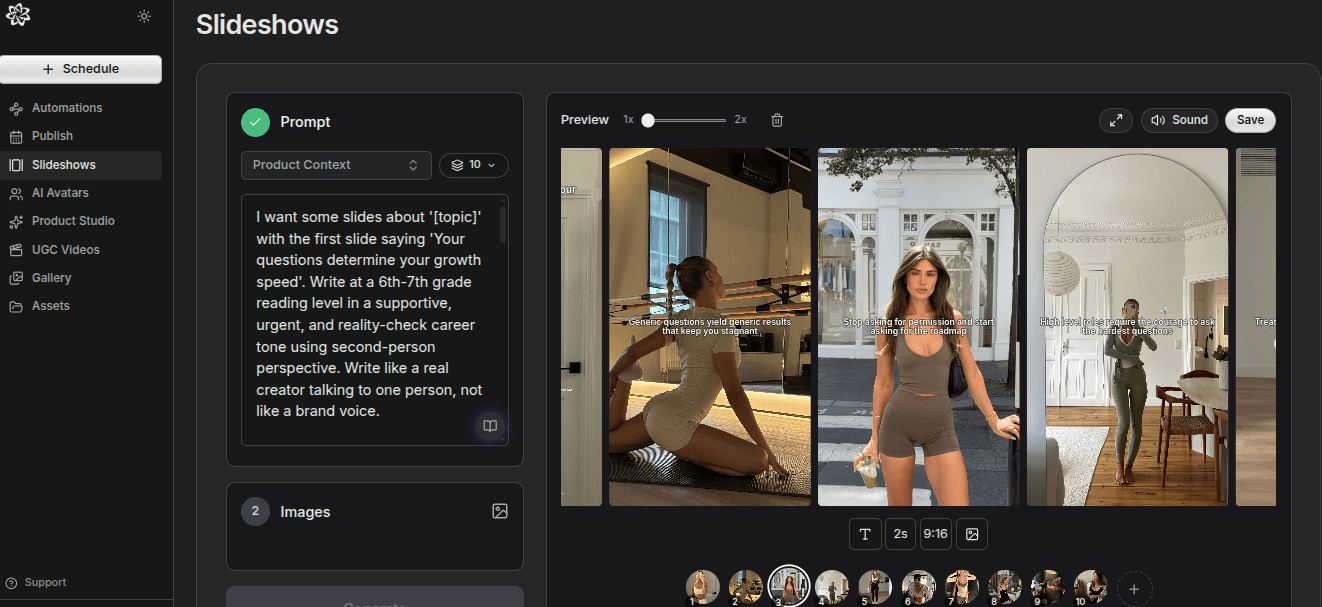
The goal is coherent content, not hiding how it was made. Follow TikTok's current labeling guidance when generated or significantly edited realistic content requires disclosure.
1. Start With an Ordinary, Specific Situation
Choose a problem people can recognize. “Preparing a bag for a rainy commute” is a clearer brief than “aesthetic lifestyle content.”
Write the lesson and the final action before generating images. This stops the visual style from taking over the post's purpose.
2. Select a Consistent Visual Direction
Define the place, lighting, color range, and main subject. For example: the same small apartment entryway, soft morning light, a dark backpack, and simple travel items.
Use source images or licensed collection images when they fit better than generated scenes. If you generate, keep the reference and brief consistent across frames. Matching colors alone will not fix an irrelevant image.
3. Give Each Frame One Task
A five-frame example could show the problem, the forgotten item, a packing method, a complete bag, and a checklist.
Do not fill every slide with the entire explanation. Use the image to carry visible details and the text to name the key point.
The product slideshow format includes a worked sequence for a software example.
4. Rewrite the Text for Reading
Replace broad language such as “elevate your daily routine” with the actual action: “Put the charger in the front pocket.” Read each slide at phone size.
If a line wraps poorly, shorten it or adjust the layout. Avoid shrinking the text until it becomes difficult to read. Remove repeated introductions on later frames.
5. Inspect Generated Details
Check hands, reflections, repeated objects, text on packaging, and object scale. Compare recurring people or products across all frames.
A scene can look plausible on its own and still break the sequence. If the bag changes color or the room changes layout without a reason, replace or regenerate that frame.
6. Add Product Context Only Where It Helps
If the post promotes a product, show what it contributes to the lesson. A product shot should not interrupt a sequence with an unrelated claim.
Use real screenshots for exact interface features. Do not use generated screens as evidence that a button or setting exists.
7. Review the Complete Export
Look through the slideshow in order on a phone. Confirm that the first slide's promise is delivered, the ending gives a clear action, and every frame is readable.
Check publication settings and the destination account. TikTok's AI-generated content guidance explains its labeling requirements.
A Reusable Brief
Try: “Create five slides about [specific problem] for [audience]. Use one consistent [setting]. Give each slide one role: problem, cause, method, example, action. Use concise text and supplied product facts only. Do not invent testimonials or measurable results.”
For a more detailed sequence, use the AI slideshow prompt guide.
FAQ
Should every slideshow use generated images?
No. Use the image source that best explains the topic and that you have permission to publish.
Does natural-looking mean I can omit AI disclosure?
No. Visual style and disclosure are separate decisions. Apply the destination platform's current rules.
Frequently Asked Questions
Should every slideshow use generated images?
No. Use the image source that best explains the topic and that you have permission to publish.
Does natural-looking mean I can omit AI disclosure?
No. Visual style and disclosure are separate decisions. Apply the destination platform's current rules.
Sources
Related tools
If you want to turn this topic into something usable right now, start with these tools.
Slideshow Outline Generator
Create carousel and slideshow outlines for educational, promotional, and story-led posts.
TikTok Hook Generator
Generate TikTok hook ideas for product demos, lessons, and founder-led content.
Instagram Caption Generator
Create Instagram caption drafts for stories, lessons, launch posts, and offers.
Related reading
- How to Create TikTok Slideshow Images with AI Without Looking Generic
Better slideshow images usually come from stronger reference choices and smaller controlled batches, not from trying to generate the whole post in one move.
- TikTok Slideshow Format: A 6-Slide Product Example
A practical product-led TikTok slideshow can use six slides: problem, context, method, example, product role, and next action. Treat this as a starting structure, not a claim that six slides always perform best.
- 11 TikTok Slideshow Ideas for Ecommerce Brands
TikTok slideshows work well for ecommerce when each frame has a job and the product appears at the right moment.
Related comparisons
- Best AI UGC Video Tools for Short-Form Content
A buying guide to AI UGC video tools, with ReelsFarm positioned for complete short-form content workflows.
- Best TikTok Automation Tools for Content Teams
A guide to TikTok automation tools for teams that need content creation, scheduling, publishing, and creative control.
- Best AI Slideshow Makers for TikTok
A guide to AI slideshow makers for TikTok, with ReelsFarm positioned for repeatable slideshow automation.
- Best AI UGC Tools for Ecommerce Brands
A source-checked guide to six AI UGC tools for ecommerce product content and publishing workflows.
Drive traffic to what matters on autopilot.
Create standout posts, line up your calendar, and publish consistently without juggling a dozen tools.