
How to Manage Multiple TikTok Accounts in One Workflow
· Multi-Account Publishing · 3 min read · Reels Farm Team · Updated
Organize multiple TikTok accounts with account records, asset naming, a shared calendar, explicit review, and destination checks before publishing.
Manage multiple TikTok accounts by keeping their audiences, assets, captions, and publishing destinations explicit. A shared calendar helps only when every post is tied to the correct account and approved file.
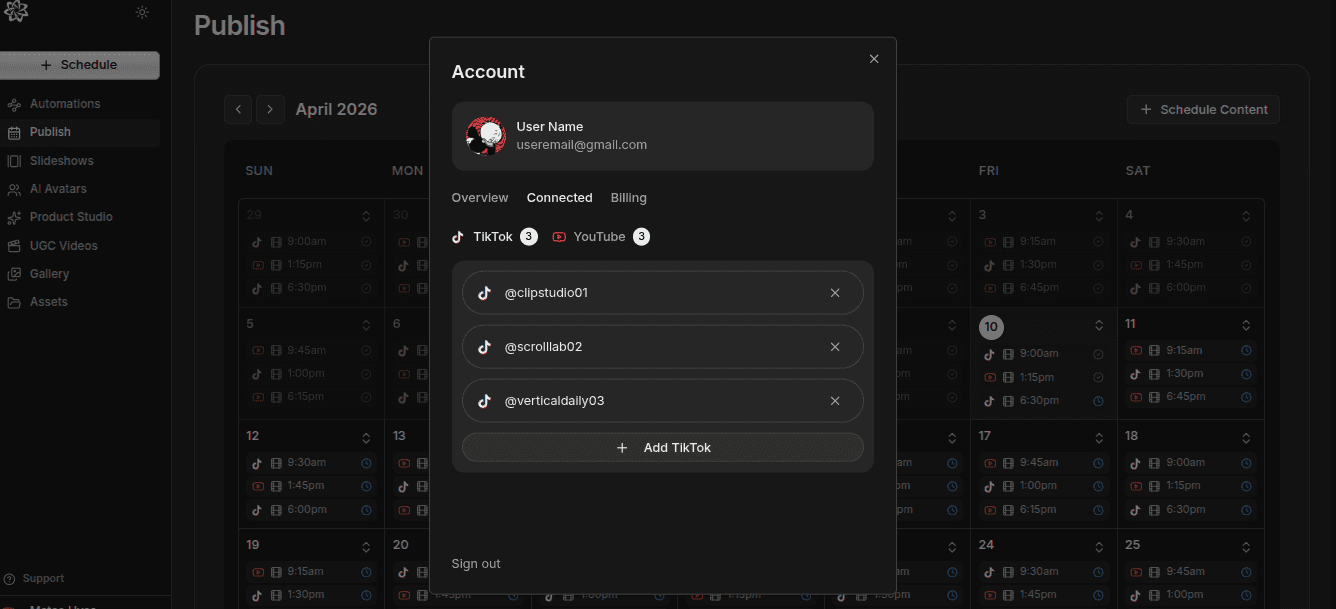
This guide covers the content workflow. It does not promise a particular account allowance. Check your publishing tool's plan and connection limits before adding destinations.
1. Create an Account Record
For each account, save its name, identifier, owner, audience, content purpose, and usual reviewer. Include the time zone used for scheduling.
If two accounts have similar display names, use the account identifier and profile image in the final check. A nickname alone is not a reliable destination reference.
2. Separate Strategy Before Separating Folders
Write a short purpose for each account. For example, one account explains product workflows and another covers customer questions.
Decide which assets can be shared and which need a different opening or caption. Reusing footage may be useful, but a post still needs to fit the destination audience.
3. Name Assets for Their Job
Use names that distinguish topic, version, and state. An example is “weekly-plan-demo-v2-approved.” Keep the caption attached to the same asset record.
Do not rely on filenames such as “final-new-final.” Preserve the source and reviewed output separately so a later edit cannot silently replace the scheduled file.
4. Use One Calendar for Committed Posts
Prepare content outside the calendar. Add it when the asset, caption, destination, and publication settings are ready.
For each calendar entry, check the account, local time, and time zone. If a teammate schedules another batch, review the same calendar before adding it. This helps expose collisions and repeated topics.
5. Make the Review Handoff Explicit
A reviewer should see the exact media, caption, destination, and time. Record approval against that combination. A later account or caption change needs another check.
If an agent prepares the work, inspect its connection mode. If a recurring automation publishes according to saved rules, inspect those rules. Do not assume a team convention creates a technical approval gate.
6. Verify Delivery by Account
After publication, check each destination result. A successful post on one account does not prove the whole batch completed.
If a post fails, inspect the error and the original attempt before retrying. Keep the returned post identifier so you can reconcile accepted work rather than creating a second copy.
A Two-Account Example
Suppose a brand account publishes product demonstrations and a founder account publishes explanations. Start with one shared source demo. Give the brand version a feature-focused opening and the founder version a decision-focused opening. Review both captions and destinations separately.
The objective is two purposeful posts, not duplicate distribution under different names.
For scheduling details, use the TikTok automation guide. For format decisions, read slideshows vs UGC videos.
FAQ
Can I reuse one asset across several accounts?
Yes, when you have the rights and it fits each audience. Check the caption, opening, and destination separately for each post.
How many accounts can I manage?
That depends on the tool, plan, and account connections. Check current limits before designing a multi-account process.
What should I fix first in a messy workflow?
Make account identity, approved asset, caption, and schedule explicit for every post. Then standardize the review handoff.
Frequently Asked Questions
Can I reuse one asset across several accounts?
Yes, when you have the rights and it fits each audience. Check the caption, opening, and destination separately for each post.
How many accounts can I manage?
That depends on the tool, plan, and account connections. Check current limits before designing a multi-account process.
What should I fix first in a messy workflow?
Make account identity, approved asset, caption, and schedule explicit for every post. Then standardize the review handoff.
Sources
Related tools
If you want to turn this topic into something usable right now, start with these tools.
Content Angle Generator
Generate content angles you can turn into hooks, captions, slideshows, or scripts.
Free Caption Formatter
Format TikTok and Instagram captions with cleaner spacing and line breaks. Keep your original wording, review the result, and copy it for posting.
Instagram Caption Generator
Create Instagram caption drafts for stories, lessons, launch posts, and offers.
Related reading
- How to Schedule TikTok Posts in 2026
Scheduling works best when the content is finished, the account is clear, and the calendar is reviewed before the week fills up.
- How to Plan a Month of TikTok Content in One Sitting
The easiest way to stay consistent is to stop planning day by day. A monthly content pass creates a calmer workflow and a stronger publishing rhythm.
- TikTok Phone Setup: Target US Audience & Account Warm-Up
Users in some countries have extremely low payment conversion rates from apps, while the US and other developed countries have a much higher rate. Here is the setup.
- Best Instagram and Facebook Schedulers for Multiple Accounts (2026)
The account limit can matter as much as the scheduler. Compare how these tools count Instagram profiles and Facebook Pages before you connect them.
- Best Social Media Tools for Small Ecommerce Teams (2026)
Small ecommerce teams need useful product content and a steady publishing workflow. These tools handle different parts of that job.
Related comparisons
- Best AI UGC Video Tools for Short-Form Content
A buying guide to AI UGC video tools, with ReelsFarm positioned for complete short-form content workflows.
- Best TikTok Automation Tools for Content Teams
A guide to TikTok automation tools for teams that need content creation, scheduling, publishing, and creative control.
- Best AI Slideshow Makers for TikTok
A guide to AI slideshow makers for TikTok, with ReelsFarm positioned for repeatable slideshow automation.
- Best AI UGC Tools for Ecommerce Brands
A source-checked guide to six AI UGC tools for ecommerce product content and publishing workflows.
Drive traffic to what matters on autopilot.
Create standout posts, line up your calendar, and publish consistently without juggling a dozen tools.