
TikTok Post Scheduler: What Actually Matters Before You Choose a Tool
· TikTok Scheduling · 8 min read · Reels Farm Team
The best TikTok post scheduler is not the one with the longest feature list. It is the one that makes scheduling clean, fast, and hard to mess up when real content starts moving.
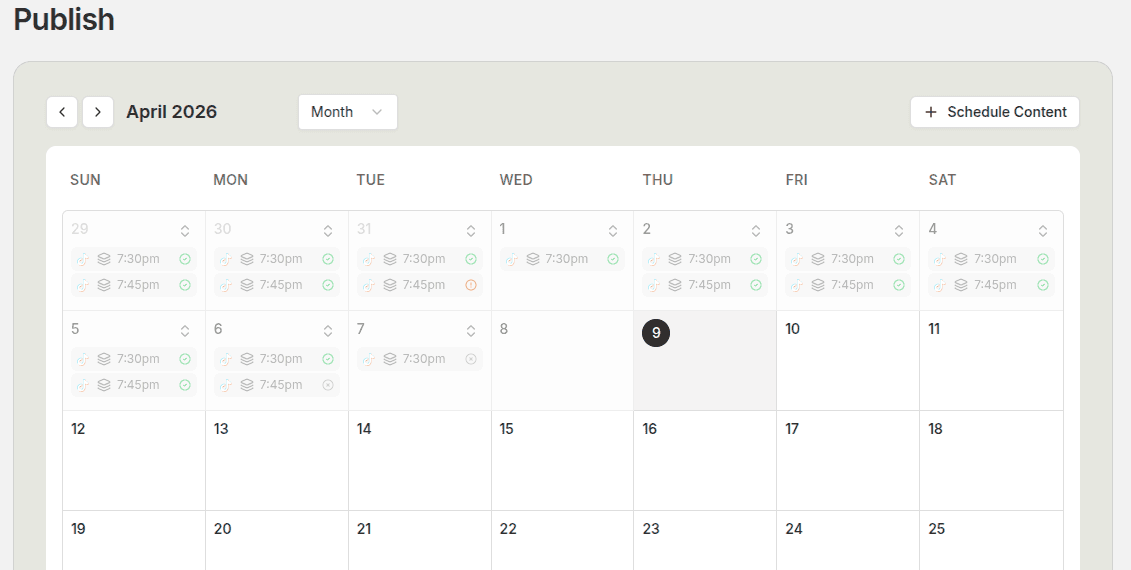
When people search for a TikTok post scheduler, they are usually further down the funnel than they look.
They are not browsing casually. They already know manual posting is annoying, inconsistent, or too fragile once the content volume starts increasing. What they want to know is whether a tool will actually make the workflow better or just move the mess into another dashboard.
Quick Answer
Before you choose a TikTok post scheduler, check five things:
- Can you move from finished content to scheduled post quickly?
- Can you see the whole month clearly?
- Can you handle multiple accounts without confusion?
- Does the tool support the content formats you actually publish?
- Does it help the workflow before and after scheduling?
If a tool fails on those five checks, the rest of the feature list does not matter much.
The First Question: Does It Fit Your Real Workflow?
A lot of scheduler pages make the decision sound simple. Connect an account, pick a date, post done.
That is not how publishing actually feels.
Real publishing has captions, revisions, account ownership, post readiness, scheduling decisions, and calendar review. If the tool only handles the last click, it will always feel more limited than the marketing page suggests.
The best schedulers fit into the workflow you already need:
- finished content goes in cleanly
- the destination account is clear
- the post settings are visible
- the schedule is easy to review
If you still need three other tools and a shared doc to make the scheduling work, you are buying partial relief, not a real fix.
Workflow Speed Matters More Than Most Comparison Tables Admit
A scheduler should reduce friction.
That means the move from finished asset to scheduled post should be short and obvious. If the content is ready, you should not have to jump through a slow approval maze, hunt for the right account, or rebuild post details from scratch every time.
This is where many comparisons go wrong. They compare integrations, pricing tiers, or surface-level toggles. They do not compare the actual speed of the workflow.
That is a mistake, because friction compounds quickly.
If the scheduler feels clumsy, teams delay using it. Then they fall back to manual posting. Then the tool looks unnecessary when the real problem was workflow drag.
Calendar Clarity Is a Bigger Differentiator Than Most People Think
You can schedule one post in almost any tool.
The real value shows up when you need to look at the week or the month and understand what is coming.
A clear calendar helps you answer useful questions fast:
- Are you posting too many similar angles back to back?
- Did you accidentally leave a gap in the second half of the month?
- Are your best posts bunching up on the same day?
- Are different accounts colliding in a way that makes review harder?
If the calendar view is weak, your planning quality drops with it.
Account Handling Becomes Critical the Moment You Scale
Single-account creators can ignore this longer.
Brands, operators, and agencies cannot.
If you manage more than one TikTok account, the scheduler needs to make account ownership obvious. You should be able to see where each post is going, avoid destination mistakes, and review account-level scheduling without guessing.
This sounds like an edge case until you have to clean up a post that was scheduled to the wrong account.
After that, it becomes a non-negotiable.
The Tool Should Match the Formats You Actually Publish
This is another place where people pick the wrong scheduler.
They buy the tool first and only later realize it fits their workflow badly.
If you mainly publish slideshows, the workflow should feel strong around slideshow-ready content. If you publish UGC videos, the scheduler should not treat video as an awkward extra. If your content system combines creation, editing, and scheduling, the scheduler should fit that reality instead of forcing the team into separate disconnected steps.
The closer the scheduler is to the content workflow itself, the more likely the tool is to stick.
What to Ignore
Not every feature deserves equal weight.
A few things are easy to overvalue:
- long lists of integrations you will never use
- tiny settings buried in a busy UI
- marketing phrases that make the tool sound broader than it feels
- feature volume without workflow depth
A shorter product with a cleaner TikTok scheduling flow is often the better choice.
FAQ
What matters most in a TikTok post scheduler?
Workflow speed, calendar visibility, account handling, and support for the formats you actually publish.
Should I choose a scheduler based on direct posting alone?
No. Direct posting matters, but it is only one part of the workflow. The bigger win is how well the tool handles everything around the post.
Does the best scheduler change if I manage multiple accounts?
Yes. Once you manage multiple accounts, destination clarity and calendar visibility become much more important.
Is a scheduler enough on its own?
Sometimes, but not always. If your creation, editing, and scheduling all live in different systems, the scheduling tool may solve only part of the problem.
Final Take
The best TikTok post scheduler is the one that makes publishing feel clean under real pressure.
That means fast movement from finished content to scheduled post, clear account handling, useful calendar views, and a workflow that fits the formats you already publish. If you evaluate tools from that angle, the decision gets a lot easier.
Related tools
If you want to turn this topic into something usable right now, start with these tools.
Content Angle Generator
Generate content angles you can turn into hooks, captions, slideshows, or scripts.
Free Caption Formatter
Format TikTok and Instagram captions with cleaner spacing and line breaks. Keep your original wording, review the result, and copy it for posting.
Instagram Caption Generator
Create Instagram caption drafts for stories, lessons, launch posts, and offers.
Related reading
- How to Schedule TikTok Posts in 2026
Scheduling works best when the content is finished, the account is clear, and the calendar is reviewed before the week fills up.
- How to Plan a Month of TikTok Content in One Sitting
The easiest way to stay consistent is to stop planning day by day. A monthly content pass creates a calmer workflow and a stronger publishing rhythm.
Related comparisons
- Best AI UGC Video Tools for Short-Form Content
A buying guide to AI UGC video tools, with ReelsFarm positioned for complete short-form content workflows.
- Best TikTok Automation Tools for Content Teams
A guide to TikTok automation tools for teams that need content creation, scheduling, publishing, and creative control.
- Best AI Slideshow Makers for TikTok
A guide to AI slideshow makers for TikTok, with ReelsFarm positioned for repeatable slideshow automation.
- Best AI UGC Tools for Ecommerce Brands
A source-checked guide to six AI UGC tools for ecommerce product content and publishing workflows.
Drive traffic to what matters on autopilot.
Create standout posts, line up your calendar, and publish consistently without juggling a dozen tools.