
How to Build a Repeatable Publish Queue for Short-Form Content
· Publishing Workflow · 8 min read · Reels Farm Team
Publishing gets stressful when finished content and almost-finished content are mixed together. A real publish queue creates a visible bridge between creation and scheduling, which makes consistency much easier to maintain.
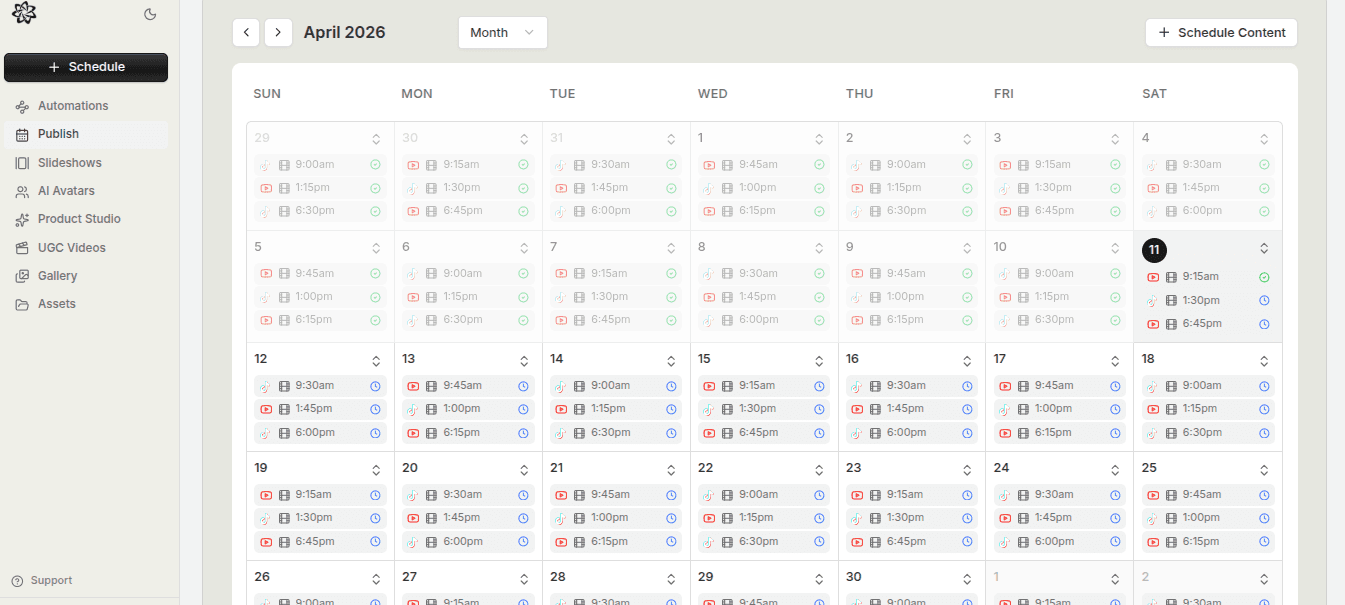
The publish queue is where a lot of short-form systems either tighten up or fall apart.
If the queue is clean, scheduling feels easier. If the queue is messy, every publish decision becomes a small recovery project.
That is why the queue matters so much. It is the handoff point between creation and publishing.
Quick Answer
To build a repeatable publish queue:
- define what counts as publish-ready
- organize ready content by format and priority
- move ready assets into the calendar quickly
- refill the queue before it runs empty
The queue should make the next publishing decision obvious.
Step 1: Define What Publish-Ready Actually Means
Most queue problems start with fuzzy readiness.
The team says a post is "basically done," but that could mean ten different things depending on the format.
A stronger rule is to define publish-ready clearly:
- the asset is finished
- the caption is ready if needed
- the destination is known
- the post has passed final review
If those things are not true, the asset may still be in production, but it should not be treated as ready-to-schedule content yet.
Step 2: Organize the Queue by Format and Priority
Once the queue only contains ready content, it becomes much easier to slot.
Useful queue organization usually includes:
- format
- destination or likely destination
- priority
- campaign or content theme
This matters because short-form systems often contain several content types at once. Slideshows, UGC videos, and avatar posts may all be viable, but they do not all serve the same need in the same week.
The queue should help the team see what is most useful next.
Step 3: Move Ready Content Into the Calendar Fast
Ready content should not sit in limbo.
If an asset is finished and the queue is working properly, it should be easy to move it into the schedule while the context is still fresh. Long delays between readiness and scheduling often create unnecessary confusion:
- captions get forgotten
- destinations get second-guessed
- content gets reshuffled for no real reason
A clean queue shortens the path from done to scheduled.
Step 4: Refill the Queue Before It Empties
The queue should not be treated like a passive storage layer.
It should have momentum.
That means checking it regularly:
- do we have enough ready content for next week?
- is one format underrepresented?
- are we depending too heavily on one type of asset?
- which batch should production create next?
This is where the queue becomes more than a list. It becomes an operational signal for what the content system needs next.
Step 5: Keep Drafts Out of the Ready Queue
This is a simple rule with outsized value.
The publish queue should not be the same place as draft storage.
As soon as draft assets and ready assets get mixed together, the queue starts lying. The calendar looks healthier than it is. The team assumes publish coverage exists when it is still waiting on real work.
A visible line between draft and ready content protects the schedule.
Step 6: Use the Queue to Support, Not Replace, Judgment
A strong queue helps the team move faster, but it should not remove editorial thinking.
Sometimes the next ready post is not the next best post to publish. The queue should make the options visible, not force decisions blindly.
That balance matters because repeatable publishing systems still need human judgment about timing, variety, and campaign fit.
Common Mistakes
Mixing draft assets with ready assets
This makes the queue less trustworthy immediately.
Letting ready posts sit too long before scheduling
That creates avoidable friction later.
Organizing the queue without clear priorities
Visibility matters, but order matters too.
Refilling the queue only when it is already empty
That turns the workflow reactive again.
FAQ
How much content should be in the queue?
Enough to keep the next scheduling window comfortable without filling the queue with weak backups.
Should the queue be separated by format?
Usually yes, at least enough that the team can see what kinds of assets are available.
Is a publish queue still useful for small teams?
Yes. In fact, small teams often benefit more because they cannot afford messy handoffs.
Final Take
A repeatable publish queue makes short-form publishing feel steadier because it gives the team a visible bridge between creation and scheduling.
Define readiness clearly, keep the queue honest, and refill it before pressure builds. That is what turns publishing consistency into something operational instead of aspirational.
Related tools
If you want to turn this topic into something usable right now, start with these tools.
Content Angle Generator
Generate content angles you can turn into hooks, captions, slideshows, or scripts.
Free Caption Formatter
Format TikTok and Instagram captions with cleaner spacing and line breaks. Keep your original wording, review the result, and copy it for posting.
Instagram Caption Generator
Create Instagram caption drafts for stories, lessons, launch posts, and offers.
Related reading
- Best Short-Form Content Calendar for Mixed Formats
The best short-form calendar makes format, readiness, timing, and destination visible enough that the month stays coherent.
- How Far in Advance Should You Schedule Short-Form Content?
Most teams should schedule repeatable content ahead of time while leaving enough space for reactive posts and still-unproven ideas.
- How to Schedule 30 Days of Short-Form Content in One Sitting
A month of content in ninety minutes. It is possible when you stop making videos one at a time and start building a batch production system.
Related comparisons
- Best AI UGC Video Tools for Short-Form Content
A buying guide to AI UGC video tools, with ReelsFarm positioned for complete short-form content workflows.
- Best TikTok Automation Tools for Content Teams
A guide to TikTok automation tools for teams that need content creation, scheduling, publishing, and creative control.
- Best AI Slideshow Makers for TikTok
A guide to AI slideshow makers for TikTok, with ReelsFarm positioned for repeatable slideshow automation.
- Best AI UGC Tools for Ecommerce Brands
A source-checked guide to six AI UGC tools for ecommerce product content and publishing workflows.
Drive traffic to what matters on autopilot.
Create standout posts, line up your calendar, and publish consistently without juggling a dozen tools.