
How to Cross-Post UGC Videos to TikTok and YouTube Shorts Without Chaos
· Publishing Workflow · 8 min read · Reels Farm Team · Updated
Cross-posting should reduce effort, not double it. The cleanest way to make that happen is to keep one strong short-form asset at the center of the workflow and treat the two destinations as organized publishing decisions around it.
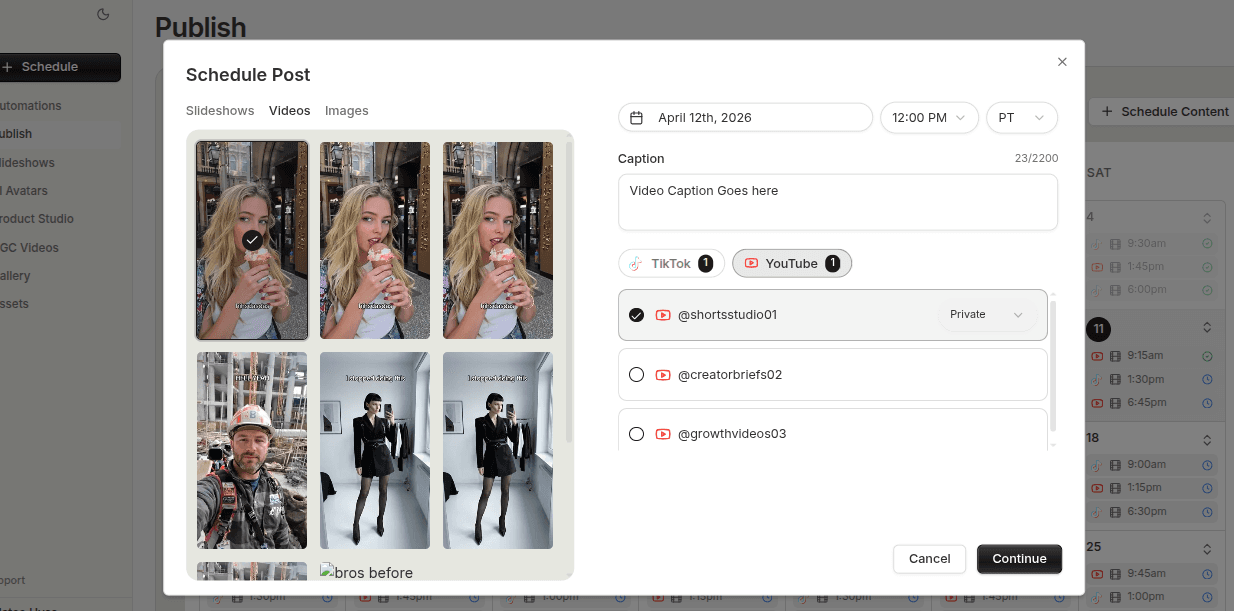
Cross-posting becomes messy when the team treats it like copy and paste.
The asset may be shared, but the workflow still needs clarity. Without that, one video becomes two scheduling tracks, two review paths, and twice as many opportunities for things to get lost.
Quick Answer
To cross-post UGC videos more cleanly:
- start with a strong shared short-form asset
- review captions and publish settings separately per destination
- keep both destinations inside one planning system
- track the asset as one content item moving to two endpoints
The goal is one organized content path, not two loosely connected ones.
Step 1: Start With the Right Shared Asset
Cross-posting only helps if the asset is worth reusing.
For many teams, modular UGC-style videos are a natural fit because they already combine:
- a hook
- product proof
- supporting clips
- a clear short-form structure
That makes them easier to publish across more than one short-form destination without rebuilding the creative each time.
Step 2: Separate Content Reuse From Publish Setup
This is one of the cleanest distinctions you can make.
The video can be shared.
The publish setup should still be reviewed:
- caption
- timing
- destination
- any platform-specific decisions that matter for the queue
This prevents a common mistake where the team assumes reuse means zero review. It does not. It just means the creative asset itself does not have to be rebuilt.
Step 3: Keep Both Destinations in One Planning View
Once the asset is ready, the biggest operational win comes from shared visibility.
You want to be able to answer:
- is this going to TikTok, YouTube Shorts, or both?
- when is each destination scheduled?
- what still needs review?
- where are the content gaps this week?
That is hard when each destination disappears into its own isolated workflow. It becomes much easier when one queue or calendar shows how the shared asset is moving.
Step 4: Track the Asset as One Reusable Unit
This matters later.
If the video performs well, the team should still be able to understand:
- which version was used
- where it was posted
- whether it was cross-posted successfully
- what other variations might still be built from it
That only happens when the asset stays organized as one reusable content unit rather than becoming two separate posts with no common trace.
Step 5: Be Honest About Which Assets Travel Well
Not every video should automatically go everywhere.
Some are strong shared assets. Others are better suited to one destination or need additional handling before reuse.
The workflow should make that easy to judge without adding too much friction. Cross-posting is most useful when it is selective and deliberate, not automatic for every file that enters the system.
Step 6: Use the Wins to Strengthen the System
When a cross-posting flow works well, save that pattern:
- the kind of asset that traveled well
- the scheduling timing that felt clean
- the queue structure that reduced confusion
That way the next shared short-form asset starts from a stronger operational template instead of a fresh guess.
Common Mistakes
Assuming the same setup should publish everywhere unchanged
The asset may be shared, but the publish step still needs attention.
Splitting the workflow into separate silos
This turns reuse into extra coordination work.
Cross-posting weak content
Distribution efficiency does not improve bad creative.
Losing track of the shared asset after publishing
That makes reuse and variation harder later.
FAQ
Which UGC videos are easiest to cross-post?
Short-form modular videos with a clear hook and product payoff tend to be the easiest shared assets.
Should every TikTok UGC video also go to YouTube Shorts?
Not automatically. The workflow should still leave room for editorial judgment.
Is cross-posting only worth it at higher content volume?
No. Even smaller teams benefit when one strong video can move through a clean shared publishing path.
Final Take
Cross-posting UGC videos works best when the creative stays centralized and the publishing stays organized.
Treat the video as one reusable asset, handle the destination details carefully, and keep both endpoints visible in one queue. That is what turns reuse into operational leverage instead of extra mess.
Related tools
If you want to turn this topic into something usable right now, start with these tools.
UGC Script Generator
Build UGC-style script outlines for testimonials, demos, and problem-solution videos.
TikTok Hook Generator
Generate TikTok hook ideas for product demos, lessons, and founder-led content.
TikTok Caption Generator
Create short TikTok captions for demos, lessons, proof posts, and quick takes.
Content Angle Generator
Generate content angles you can turn into hooks, captions, slideshows, or scripts.
Related reading
- How to Schedule TikTok and YouTube Shorts From One Workflow
Cross-platform scheduling works best when the base short-form asset is finalized once and the destination settings are reviewed separately.
- How to Build a Repeatable Publish Queue for Short-Form Content
A repeatable publish queue depends on clear readiness rules, visible prioritization, and a clean handoff from creation into scheduling.
- 10 Ways to Repurpose TikTok Videos for Instagram Reels
Repurpose your TikTok videos for Instagram Reels from a clean source export. Check the audio, text layout, caption, and destination settings before publishing. You do not need to change everything when the existing edit already fits.
- Best Cross-Posting Tools for Short-Form Video (2026)
Cross-posting can save time, but the tool should make each destination clear and let you adjust the post for that platform.
- Best Instagram and Facebook Schedulers for Multiple Accounts (2026)
The account limit can matter as much as the scheduler. Compare how these tools count Instagram profiles and Facebook Pages before you connect them.
Related comparisons
- Best AI UGC Video Tools for Short-Form Content
A buying guide to AI UGC video tools, with ReelsFarm positioned for complete short-form content workflows.
- Best TikTok Automation Tools for Content Teams
A guide to TikTok automation tools for teams that need content creation, scheduling, publishing, and creative control.
- Best AI Slideshow Makers for TikTok
A guide to AI slideshow makers for TikTok, with ReelsFarm positioned for repeatable slideshow automation.
- Best AI UGC Tools for Ecommerce Brands
A source-checked guide to six AI UGC tools for ecommerce product content and publishing workflows.
Drive traffic to what matters on autopilot.
Create standout posts, line up your calendar, and publish consistently without juggling a dozen tools.