
How to Organize Slideshows, UGC Videos, and Avatar Posts in One Calendar
· Publishing Workflow · 8 min read · Reels Farm Team
A content calendar gets harder to manage when each format has a different production path. The answer is not separating everything forever. It is giving each format a clear role inside one visible plan.
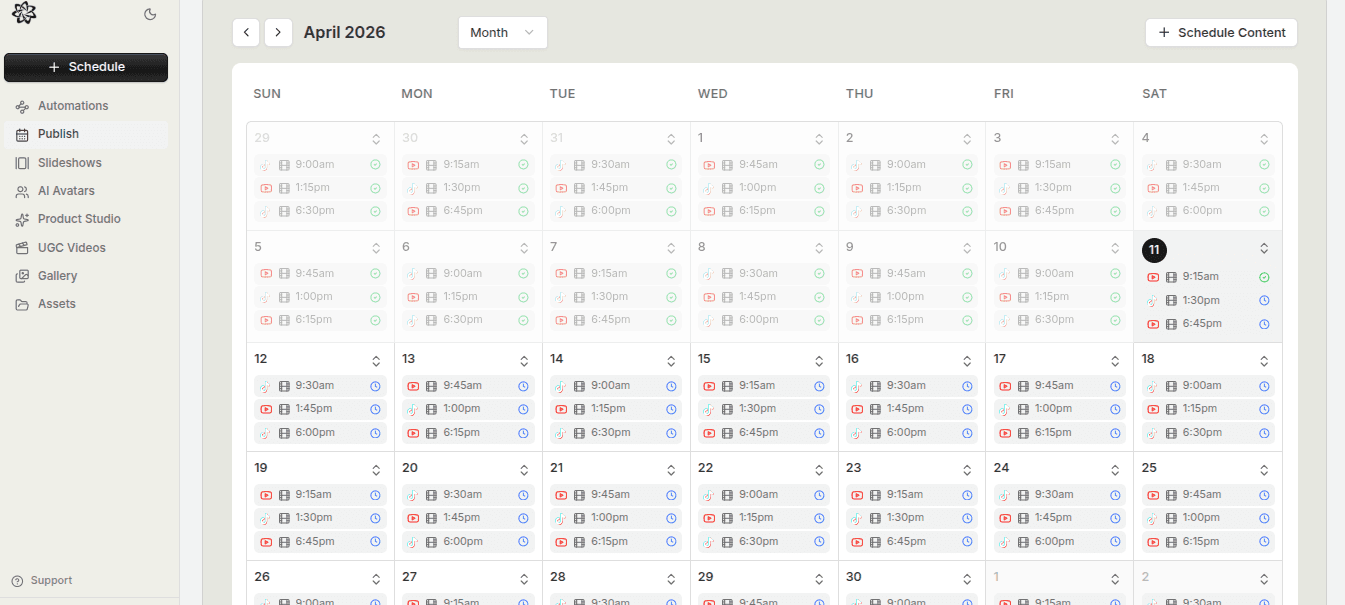
A mixed-format content calendar can either feel powerful or chaotic.
The difference usually comes down to whether each format has a clear job.
If slideshows, UGC videos, and avatar posts are all entering the same calendar with no distinct role, the month starts to look random fast.
Quick Answer
To organize mixed short-form formats in one calendar:
- give each format a clear publishing job
- batch the production work by format
- review the week at the format level
- keep the calendar visible while content is still being made
The calendar should guide production, not just store finished assets.
Step 1: Give Each Format a Job
The easiest way to reduce clutter is to define what each format is for.
For example:
- slideshows for subtle product-led education or selling
- UGC videos for hook, demo, and proof-driven short-form content
- avatar posts for image-led campaign creative or visual support content
This matters because it helps the team understand what belongs in each slot. The calendar becomes more strategic when formats are tied to functions instead of just file types.
Step 2: Batch Similar Work Together
Production gets easier when the team is not switching formats constantly.
If one day is spent building slideshows, another assembling UGC videos, and another generating avatar-led creative, the output usually gets cleaner and the calendar fills more predictably.
Batching also helps because each format has a different review standard. Slideshows need different checks from UGC videos. Avatar-led image posts need a different kind of brand review from both.
Grouping the work reduces mental switching and makes the calendar easier to feed.
Step 3: Review the Week at the Format Level
Once several formats are inside the same schedule, zoom out.
Look at the week and ask:
- are too many posts from the same format grouped together?
- does the variety feel intentional or accidental?
- are the strongest formats carrying too much of the load?
- are certain content types underused even though they are easier to repeat?
This is where a mixed-format calendar gets smarter. It stops being a list of scheduled assets and starts behaving like a publishing system.
Step 4: Keep the Calendar Visible During Production
A lot of teams wait until the content is finished before looking at the calendar seriously.
That is too late.
The schedule should be visible while the content is being created, because the calendar can answer useful planning questions:
- which format is needed next?
- where is the next gap?
- do we need another UGC slot or another slideshow slot?
- what kind of asset should the team build this week?
That turns the calendar into a guide for creation, not just a record of what already exists.
Step 5: Separate Readiness From Scheduling
Mixed-format calendars become messy when unfinished ideas are treated like publish-ready posts.
The cleaner approach is to keep readiness rules visible:
- is the asset finished?
- has it been reviewed?
- is the destination clear?
- is it ready to be placed?
This matters more in multi-format systems because each format has different ways to be "almost done." Without clear readiness standards, the calendar fills with placeholders and half-finished decisions.
Step 6: Keep the Calendar Coherent, Not Perfectly Even
A strong month does not require perfect rotation.
It requires coherence.
Some weeks may lean more heavily toward one format depending on the campaign. That is fine. What matters is that the format mix still makes sense strategically and does not feel like the result of whatever assets happened to be ready first.
Common Mistakes
Treating every format as interchangeable
Formats are more useful when they have distinct jobs.
Hiding the calendar until production is finished
The schedule should help steer the work earlier.
Filling the month with placeholders
That makes the calendar look cleaner than the workflow actually is.
Letting one format dominate by accident
The calendar should reflect strategy, not production drift.
FAQ
Do different formats need separate calendars?
Usually no. One visible calendar is often more useful as long as the format roles stay clear.
What is the best way to balance format mix?
Balance it around campaign goals and repeatability, not around forced equal distribution.
Should mixed-format calendars be planned monthly or weekly?
Both views help. The month gives you distribution clarity. The week helps manage execution.
Final Take
Mixed-format calendars work when they are built around clarity.
Give each format a job, batch the production work sensibly, and keep the schedule visible while content is still being made. That is how one calendar can hold several content types without turning the month into noise.
Related tools
If you want to turn this topic into something usable right now, start with these tools.
Slideshow Outline Generator
Create carousel and slideshow outlines for educational, promotional, and story-led posts.
TikTok Hook Generator
Generate TikTok hook ideas for product demos, lessons, and founder-led content.
Instagram Caption Generator
Create Instagram caption drafts for stories, lessons, launch posts, and offers.
UGC Script Generator
Build UGC-style script outlines for testimonials, demos, and problem-solution videos.
Related reading
- Best Short-Form Content Calendar for Mixed Formats
The best short-form calendar makes format, readiness, timing, and destination visible enough that the month stays coherent.
- How to Build a Repeatable Publish Queue for Short-Form Content
A repeatable publish queue depends on clear readiness rules, visible prioritization, and a clean handoff from creation into scheduling.
- How to Cross-Post UGC Videos to TikTok and YouTube Shorts Without Chaos
Cross-posting works best when the base UGC video is strong, the platform details are reviewed separately, and both destinations stay visible in one queue.
Related comparisons
- Best AI UGC Video Tools for Short-Form Content
A buying guide to AI UGC video tools, with ReelsFarm positioned for complete short-form content workflows.
- Best TikTok Automation Tools for Content Teams
A guide to TikTok automation tools for teams that need content creation, scheduling, publishing, and creative control.
- Best AI Slideshow Makers for TikTok
A guide to AI slideshow makers for TikTok, with ReelsFarm positioned for repeatable slideshow automation.
- Best AI UGC Tools for Ecommerce Brands
A source-checked guide to six AI UGC tools for ecommerce product content and publishing workflows.
Drive traffic to what matters on autopilot.
Create standout posts, line up your calendar, and publish consistently without juggling a dozen tools.