
How to Schedule TikTok and YouTube Shorts From One Workflow
· Publishing Workflow · 8 min read · Reels Farm Team
Publishing gets messy when the asset is shared but the workflow is split in two. A cleaner system starts with one strong short-form video and then handles platform details without breaking the whole schedule apart.
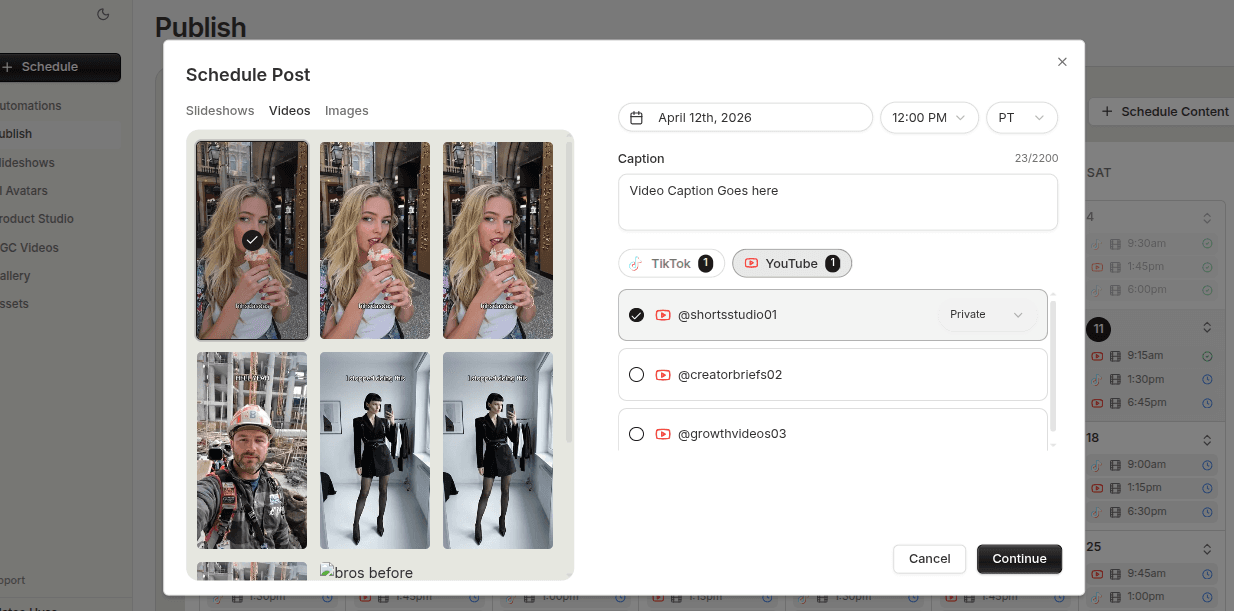
Cross-platform publishing sounds efficient until the workflow gets duplicated.
One team finishes the short-form video, then TikTok lives in one process, YouTube lives in another, and suddenly the same asset has to survive two sets of handoffs, two sets of timing decisions, and two chances to get lost.
That is where a unified scheduling workflow becomes useful.
Quick Answer
The cleanest way to schedule TikTok and YouTube Shorts from one workflow is:
- finalize the short-form video once
- keep the asset separate from the destination rules
- review timing, captions, and publish settings per platform
- schedule from one planning view
- check the full queue before the week starts
The shared asset should stay central. The platform-specific details should sit around it cleanly.
Step 1: Start With a Format That Fits Both Platforms
Not every content type translates equally well across destinations.
For a shared TikTok and YouTube workflow, short-form video is the safest common ground. In practice, modular UGC-style video is often a particularly good fit because it already combines hooks, demos, and supporting clips in a way that can work on both platforms.
The important part is that the base asset should be strong on its own. Cross-platform scheduling does not fix weak creative. It only helps distribute strong creative more cleanly.
Step 2: Separate the Asset From the Destination Rules
This is where a lot of teams create unnecessary chaos.
They treat each destination like a full creative restart instead of a publishing variation around one finished asset.
A better system keeps the asset stable and then reviews destination-specific details separately:
- caption
- timing
- account or channel destination
- publish settings
That way the content stays centralized while the platform rules still get the attention they need.
Step 3: Schedule From One Planning View
A unified calendar or queue matters more than most teams expect.
It lets you answer questions quickly:
- what is going live where?
- are the two destinations landing on the same day?
- is the publishing cadence still balanced?
- are you duplicating work by accident?
A single planning view does not mean every platform gets identical treatment. It means the team can see the whole distribution picture without bouncing between disconnected systems.
Step 4: Review the Queue Before Publishing Week Starts
Cross-platform workflows become fragile when the review happens too late.
The right time to catch problems is before the week fills up, not when the post is already due.
Look for:
- unfinished captions
- incorrect destinations
- timing conflicts
- weak gaps in the content plan
This is where the workflow starts saving real time. The team is not reacting platform by platform. It is reviewing a coordinated publish queue.
Step 5: Keep the Workflow Honest About What Is Shared
A clean shared workflow should still acknowledge a simple reality. Shared does not mean identical.
Some assets can move cleanly across both destinations with only light destination review. Others may need slightly different handling or may only truly belong on one platform.
That judgment matters. Cross-platform efficiency only helps when the team knows which assets are genuinely reusable and which ones are not.
Step 6: Build the System Around Repeatability
The more repeatable the content is, the more value the shared scheduling workflow creates.
That is why evergreen UGC sequences and repeatable short-form formats often benefit most. Once the asset production process is stable, the scheduling process can become much smoother because the team is no longer solving everything from zero each time.
Common Mistakes
Treating every platform as a full restart
That creates duplicate work fast.
Assuming one set of details works everywhere automatically
Shared asset does not mean identical publish setup.
Hiding the schedule across separate tools
A split planning view makes coordination harder.
Cross-posting unfinished creative
The base video still needs to be worth distributing.
FAQ
Which format is safest for both TikTok and YouTube Shorts?
Short-form video is the clearest shared format, especially when the workflow is already built around modular UGC-style content.
Should every shared video publish at the same time on both platforms?
Not necessarily. Timing should still reflect the platform plan, even if the asset is shared.
Is a unified workflow only useful for large teams?
No. Even smaller teams benefit when one finished asset can move through one clean publishing path instead of two messy ones.
Final Take
Scheduling TikTok and YouTube Shorts from one workflow works best when the asset stays central and the platform details stay organized around it.
Finalize the video once, separate the destination rules cleanly, and keep the whole schedule visible in one planning system. That is what turns cross-platform publishing into leverage instead of extra overhead.
Related tools
If you want to turn this topic into something usable right now, start with these tools.
Content Angle Generator
Generate content angles you can turn into hooks, captions, slideshows, or scripts.
Free Caption Formatter
Format TikTok and Instagram captions with cleaner spacing and line breaks. Keep your original wording, review the result, and copy it for posting.
Instagram Caption Generator
Create Instagram caption drafts for stories, lessons, launch posts, and offers.
TikTok Caption Generator
Create short TikTok captions for demos, lessons, proof posts, and quick takes.
Related reading
- How to Cross-Post UGC Videos to TikTok and YouTube Shorts Without Chaos
Cross-posting works best when the base UGC video is strong, the platform details are reviewed separately, and both destinations stay visible in one queue.
- How to Build a Repeatable Publish Queue for Short-Form Content
A repeatable publish queue depends on clear readiness rules, visible prioritization, and a clean handoff from creation into scheduling.
- How to Organize Slideshows, UGC Videos, and Avatar Posts in One Calendar
Mixed-format calendars work better when each format has a clear role and the schedule stays visible while the content is still being produced.
Related comparisons
- Best AI UGC Video Tools for Short-Form Content
A buying guide to AI UGC video tools, with ReelsFarm positioned for complete short-form content workflows.
- Best TikTok Automation Tools for Content Teams
A guide to TikTok automation tools for teams that need content creation, scheduling, publishing, and creative control.
- Best AI Slideshow Makers for TikTok
A guide to AI slideshow makers for TikTok, with ReelsFarm positioned for repeatable slideshow automation.
- Best AI UGC Tools for Ecommerce Brands
A source-checked guide to six AI UGC tools for ecommerce product content and publishing workflows.
Drive traffic to what matters on autopilot.
Create standout posts, line up your calendar, and publish consistently without juggling a dozen tools.