
How to Put Your Product in an Avatar's Hand for Better Ads
· Product Studio · 8 min read · Reels Farm Team
A good avatar image becomes a better ad when the product feels like it belongs in the scene. That usually comes down to asset quality, brand fit, and much more specific placement direction than most teams expect.
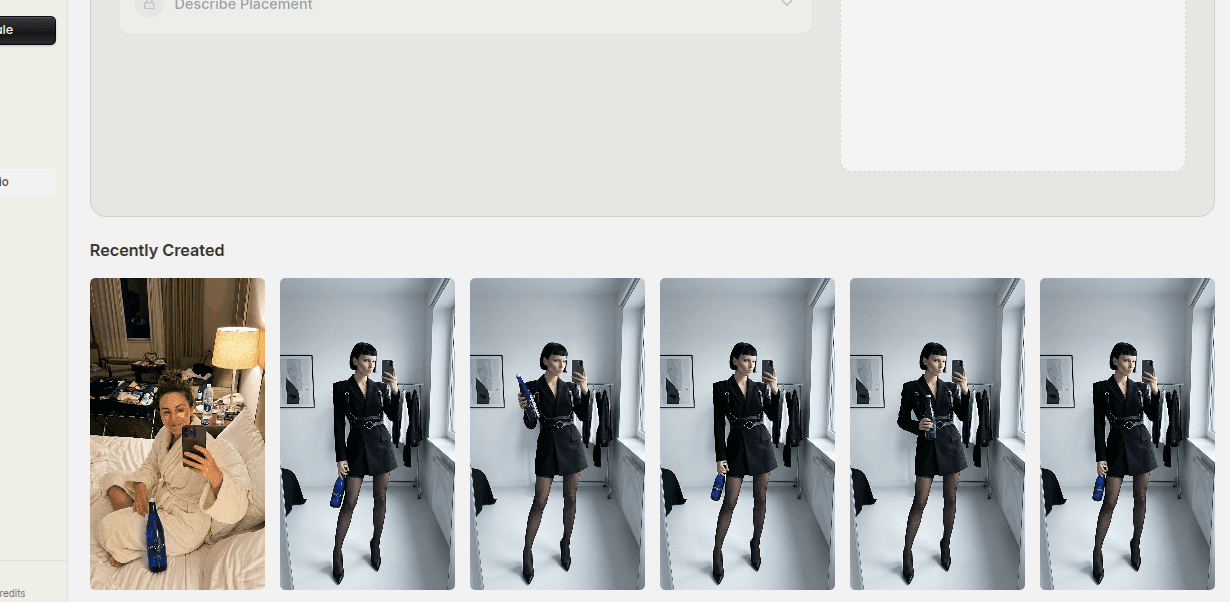
Product-in-hand creative is one of the fastest ways to make an avatar image feel more commercially useful.
It gives the viewer a clearer relationship between the person and the product. It helps the ad feel less abstract. It also creates the kind of image brands often want for paid social, landing page sections, and repeatable campaign assets.
The catch is that product placement needs to feel believable. An AI product placement workflow can help you build the scene from the product image and avatar.
Quick Answer
If you want better product-in-hand avatar ads:
- choose an avatar that fits the product
- start with a clean product asset
- describe the hand placement clearly
- review the final image like an ad, not just a generation
The product should feel naturally held, properly scaled, and still easy to notice inside the composition.
Step 1: Choose an Avatar That Fits the Product
The placement will always look weaker if the avatar choice is wrong.
Before anything else, ask:
- would this character realistically be associated with the product?
- does the style fit the audience?
- does the pose make sense for a held object?
- does the scene support the offer?
This matters because product-in-hand creative depends on context. A beauty product, a clothing accessory, and a supplement all ask for different types of scenes and character energy.
If the avatar and the product feel disconnected, the composition has to fight uphill from the start.
Step 2: Start With a Clean Product Asset
Weak product input shows up quickly in composited creative.
If the source asset is low quality, badly cropped, poorly lit, or visually unclear, the final result usually feels fake even if the avatar generation itself is good.
Good product assets should be:
- easy to recognize
- clearly cut or isolated if needed
- visually consistent with the intended ad style
- strong enough to remain legible inside the final scene
This is especially important for smaller products, packaging-heavy products, and items where shape recognition carries part of the brand value.
Step 3: Describe the Placement Precisely
This is where many teams stay too vague.
"Holding the product" is not enough direction.
A stronger prompt usually specifies:
- which hand
- how the product is angled
- whether the hand is presenting it or using it
- how close it is to the face or body
- whether the product is the hero or one element in a larger scene
Precision matters because the relationship between body, hand, and product is what makes the result feel natural. When the placement lacks detail, the result often feels awkward or loosely attached to the scene.
Step 4: Think About Scale and Attention Together
Even when the placement is technically correct, the image can still fail as an ad if the product disappears.
That is why scale matters.
The product should not feel oversized just to get noticed, but it also should not become so small that the image reads as "person in a scene" instead of "person presenting a product."
A useful review question is simple:
If someone saw this image quickly in a feed, would they understand what is being shown and why the product matters?
If the answer is no, the balance probably needs work.
Step 5: Make the Scene Support the Offer
Product-in-hand images are often strongest when the background and setting reinforce the offer.
That does not mean the scene should be busy. It means it should help the product make sense.
Examples:
- skincare in a clean personal-care environment
- fashion or accessory products in lifestyle scenes
- wellness products in calm, light compositions
- founder or creator-style product images in casual, recommendation-style settings
The product should still lead, but the environment can help make the ad feel more intentional.
Step 6: Review the Output Like a Marketing Image
Do not stop at "this looks cool."
Look at the image like a marketer:
- is the product clear?
- does the hand look believable?
- does the avatar fit the audience?
- does the composition feel ad-ready?
- could this support a campaign asset set?
That last question matters because a strong result is rarely just one image. It is usually the start of a reusable variation system.
Common Mistakes
Using the wrong avatar for the product
Strong generation quality cannot fix weak brand fit.
Starting from a poor product asset
The final image inherits input quality problems fast.
Writing vague placement instructions
This often creates awkward positioning or weak product visibility.
Letting the scene overpower the product
The product still needs to earn attention inside the final image.
FAQ
Which products work best for product-in-hand creative?
Products that benefit from a clear human relationship often work well, especially items that feel more persuasive when someone is visibly presenting or using them.
Is product-in-hand better than product-on-table?
It depends on the ad. Product-in-hand often adds more human context. Product-on-table can be cleaner when packaging detail or visual precision matters more.
Does the avatar need to be facing the camera?
Not always. What matters more is whether the product remains visible and the scene still supports the commercial goal.
Final Take
Putting a product in an avatar's hand works best when the placement feels intentional, not incidental.
Choose the right character, start with a usable product asset, describe the placement clearly, and review the final result like a real ad. That is what turns a composited image into something worth publishing or testing.
Related tools
If you want to turn this topic into something usable right now, start with these tools.
Content Angle Generator
Generate content angles you can turn into hooks, captions, slideshows, or scripts.
Instagram Caption Generator
Create Instagram caption drafts for stories, lessons, launch posts, and offers.
CTA Generator
Create call-to-action lines for captions, carousels, videos, and offer-led posts.
Related reading
- How to Create AI Avatars for Ads Without Hiring Models
Better AI avatar ads come from stronger role definition, better references, and saving the characters that actually fit the brand.
- How to Create Ecommerce Ad Images With AI Avatars
To create ecommerce ad images with AI avatars, define the product message first. Then choose a suitable character, supply a clear product reference, and review the result for both visual quality and product accuracy.
- When to Use Product Studio vs Traditional Product Photography
Product Studio and traditional photography solve different problems. The better choice depends on speed, variation needs, and the type of output the campaign requires.
Related comparisons
- Best AI UGC Video Tools for Short-Form Content
A buying guide to AI UGC video tools, with ReelsFarm positioned for complete short-form content workflows.
- Best TikTok Automation Tools for Content Teams
A guide to TikTok automation tools for teams that need content creation, scheduling, publishing, and creative control.
- Best AI Slideshow Makers for TikTok
A guide to AI slideshow makers for TikTok, with ReelsFarm positioned for repeatable slideshow automation.
- Best AI UGC Tools for Ecommerce Brands
A source-checked guide to six AI UGC tools for ecommerce product content and publishing workflows.
Drive traffic to what matters on autopilot.
Create standout posts, line up your calendar, and publish consistently without juggling a dozen tools.