
How to Make a Slideshow on TikTok (2026 Guide)
· TikTok slideshows · 7 min read · Reels Farm Team
Pick your photos, put them in order, add text and a sound, and post. Here is every step in the TikTok app, the options for a computer, and what works best in 7,736 real slideshows.
To make a slideshow on TikTok, tap +, choose Photo, then tap Upload and select up to 35 photos in the order you want. Tap Next, add text and a sound, tap Next again, write the title and description, pick a cover, and tap Post. Viewers then swipe through your photos one by one.
This guide covers each step in the app, the options when you work from a computer, and how to add music, text and video. It ends with what our data says about how many photos to use and how big they should be.
How to make a slideshow on TikTok in the app
The steps are the same on iPhone and Android.
- Open TikTok and tap + at the bottom of the screen.
- Tap Photo, then Upload. Your photo library opens.
- Select your photos in order. You can pick up to 35. The order you tap them in is the order viewers see them in.
- Tap Next. You are now in the editor.
- Edit each photo. Swipe between the photos to add text, stickers or a filter, or to crop a photo. Tap the sound option to add music.
- Tap Next again. Write the title and the description, add hashtags, and tap Edit cover to choose the first photo people see. The cover guide covers this step.
- Choose who can view the post, then tap Post. Tap Drafts instead if you want to finish it later.
TikTok's own help page, Making a post, lists the same steps. Its Creator Academy adds one tip that is easy to miss: crop all photos to the same ratio, so the slideshow does not jump in size as people swipe.
Photo post or video slideshow
TikTok can show your photos in two ways.
- Photo post (swipe slideshow). Viewers swipe through the photos at their own pace. This is what most people mean by a TikTok slideshow, and it is the format in the Slideshow Ideas library.
- Video slideshow. The photos play one after another as a single video, on a timer.
In the editor, a switch at the bottom of the screen turns one into the other. Its label has changed between app versions ("Switch to photo mode" or "Switch to video mode"), so look for that wording. Use a photo post for lists, tips and stories that people read. Use a video when the photos need to match the beat of the sound.
How to make a TikTok slideshow on a computer
TikTok's help pages describe uploads from a computer for videos only: an MP4 or WebM file of at least 720x1280 pixels. They do not describe photo posts from the web. That leaves two ways to work from a computer:
- Export the slideshow as a video and upload the video in TikTok Studio. It then plays as a video slideshow, not a swipe post.
- Use a scheduler that posts photo posts through TikTok's Content Posting API. The API accepts up to 35 photos, a title of up to 90 characters and a description of up to 4,000 characters. Our scheduler posts slideshows this way, so you can build them on a laptop and they still arrive on TikTok as swipe posts.
How to add music or your own sound
In the editor, tap the sound option and pick one sound. A photo post has one sound for all slides.
Two rules matter for brands. Business accounts can only use sounds from TikTok's Commercial Music Library, and TikTok asks you to use sounds that are commercially available or that you have the rights to. TikTok does not describe a way to upload your own audio file to a photo post.
If you post from another tool, TikTok does not let that tool pick a sound from its library. Send the post to your TikTok drafts instead, and add the sound in the app before you publish.
How to add a video to a slideshow
TikTok's editor takes up to 35 items, and they can be photos and videos together. Guides that tested the mix report that TikTok then makes a video, not a swipe post. If you want a swipe post, use photos only. To show a clip, take a few screenshots from it, or put the clip in a separate video post.
How to add text to a TikTok slideshow
Text goes on each photo on its own. Swipe to a photo, tap Text, type, and pick a style. Repeat for each slide. The text guide covers the styles and the safe area in detail. Photo posts also have a title that shows above the description, which is a good place to repeat your hook.
Keep text away from the bottom and the right side of the screen, where TikTok shows the caption and the buttons. The TikTok safe zone template shows the exact areas, and the TikTok fonts page shows the fonts in the app's text tool.
How many photos should a TikTok slideshow have?
We looked at 7,736 TikTok slideshows from 876 creators in our slideshow statistics study.
- 6 photos is the most common length. 30% of the slideshows had exactly 6.
- 3-photo slideshows had the highest median views, 8,700, against 4,000 for all slideshows.
- Long slideshows get saved more. Slideshows with 9 or more photos had a median save rate of 2.2%, against 1.0% for 2 photos.
Use 3 to 4 photos for a quick hook and punchline, where reach matters most. Use 8 to 10 photos for lists and guides that people save. The study on slide counts has the full numbers.
What size should TikTok slideshow photos be?
TikTok does not publish one image size for photo posts. Most guides recommend 1080x1920 pixels (9:16), which fills the whole screen. Real slideshows vary more than that. In our data:
- 3:4 was used by 48% of slideshows.
- 9:16 by 28%.
- 4:5 by 13%.
- 1:1 and wider photos by the rest.
Pick one ratio and use it for every photo. If your text sits near the edges, 9:16 leaves the least room for surprises. The size guide has the pixel sizes and file limits. The TikTok slideshow template shows example slides you can start from.
Make slideshows faster
Making one slideshow by hand takes a few minutes. Making one every day for several accounts takes hours, and most of that time goes into writing the text and finding photos.
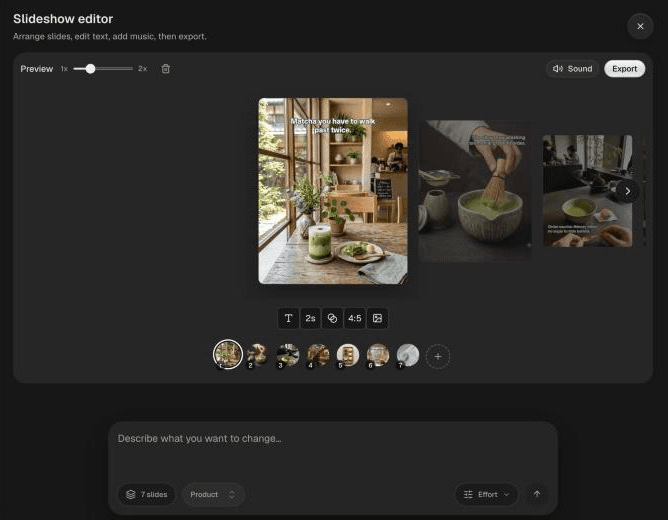
Our slideshow editor does those parts for you:
- Start from a prompt or a TikTok link. Describe the slideshow you want, or paste a link to a slideshow that already works and recreate its format for your product.
- Get the text and photos. The AI writes the text for each slide in TikTok text styles. Photos come from your library, a photo search, or the slideshow you recreate. You can change any word or photo.
- Post it or schedule it. Slideshows go to TikTok as swipe photo posts of up to 20 photos, now or at a set time. You can also send them to your TikTok drafts to add a sound in the app.
If you use ChatGPT or Claude, you can do all of this from the chat. The TikTok MCP server page shows how to connect it.
Common problems
- The photos jump in size as you swipe. They have different ratios. Crop them all to the same ratio before you upload.
- The text is hidden behind the buttons. Move it toward the top or the middle of the photo. Check it against the safe zone.
- Your sound is not available. On a business account, only sounds from the Commercial Music Library show up.
- The post turned into a video. You probably selected a video together with your photos. Use photos only for a swipe post.
Frequently Asked Questions
How many photos can you put in a TikTok slideshow?
Up to 35 photos in one photo post. In our library of 7,736 slideshows, 6 photos is the most common length, and 3-photo slideshows had the highest median views.
Can you make a TikTok slideshow on a computer?
TikTok's help pages describe uploads from a computer for videos only. To post from a computer, export your slideshow as a video and upload it, or use a scheduler that posts photo posts through TikTok's Content Posting API.
Can you add music to a TikTok slideshow?
Yes. Tap the sound option in the editor and pick one sound for the whole post. Business accounts can only use sounds from TikTok's Commercial Music Library.
Can you add text to every slide at once?
In the TikTok app, you add text photo by photo: swipe to a photo, tap Text, and type. Photo posts also have a title above the description.
How do you change the cover of a TikTok slideshow?
Before you post, tap Edit cover on the screen with the description and pick the photo to show first. If you do not choose one, TikTok uses the first photo.
Sources
Related tools
If you want to turn this topic into something usable right now, start with these tools.
Slideshow Outline Generator
Create carousel and slideshow outlines for educational, promotional, and story-led posts.
TikTok Hook Generator
Generate TikTok hook ideas for product demos, lessons, and founder-led content.
Instagram Caption Generator
Create Instagram caption drafts for stories, lessons, launch posts, and offers.
Related reading
- How to Add Text to a TikTok Slideshow (2026)
In a TikTok photo post, text goes on each photo on its own. This guide shows the steps, the styles, where to place text so the buttons do not cover it, and what to do when the text tool will not work.
- How to Change the Cover of a TikTok Slideshow
The cover is the photo people see in the feed and on your profile. This guide shows how to choose it before you post, what to do when Edit cover is missing, and which covers got the most views.
- TikTok Slideshow and Carousel Size: Dimensions for 2026
TikTok does not publish one photo size for slideshows. This guide gives the sizes that work, the sizes real slideshows use, the safe area in pixels, and the limits for apps that post for you.
- How to Write TikTok Slideshow Hooks That Get the First Swipe to Stop
The first frame does most of the heavy lifting. If the hook is weak, the rest of the slideshow rarely gets a fair chance.
Related comparisons
- Best AI Slideshow Makers for TikTok
AI slideshow makers for TikTok compared on output, text styles, posting and price.
- Best Fastlane Alternatives for Short-Form Content Automation
Fastlane alternatives compared on slideshows, UGC video, posting and price.
- Best Reel.farm Alternatives for TikTok and UGC Automation
Reel.farm alternatives compared on slideshows, platforms, video features and price.
- ReelsFarm vs Canva for TikTok Slideshows
ReelsFarm vs Canva for making and posting TikTok slideshows.
Drive traffic to what matters on autopilot.
Create standout posts, line up your calendar, and publish consistently without juggling a dozen tools.